Author: Sagara Technology

  • What is Digital Talent and How to Be One of Them?

    What is Digital Talent and How to Be One of Them?

    A list of what you—an aspiring digital talent—and your organization needs to do.

    One of the words you might hear the most in this fast era is “digital”, isn’t it? Nowadays, Almost all aspects of life are exposed to technology. Day after day, people are trying to figure out new technology and develop the most suitable digital environment. As a country having a demographic bonus in 2045, is this an opportunity or threat for Indonesia?

    Well, it certainly can be both. That can be a big opportunity since the country has a productive age population more than the non-productive population. But it can turn out to be a threat if people do not get a decent education or do not bother to learn the skill needed to be a digital talent. Here is why.

    Definition of digital talent

    If you know someone who is a digital marketer, web developer, or UX designer, they are some examples of digital talent. Digital talent is someone who has the technological skills to make things easier. However, technical skill alone is not enough.

    Digital talent needs to have business acumen as well as hard skills. They need to understand the reasons behind the actions, not just know how to use technology. For example, when a UX writer works on a certain project, they should understand who the target user is and how this project will enhance user experience while UX writers work to make some profits.

    Why digital talent is crucial for business?

    Let’s look at Indonesia, one of the developing countries which have great potential. Indonesia is the world’s fourth-largest country by population. The labor force in this country is projected to reach over 200 million by 2045.

    Furthermore, many digital businesses have sprung up in Indonesia. It undoubtedly boosts the economy by absorbing a huge labor force for the business and afterward, increasing economic growth.

    Digitalization is a game-changer for production systems. Talking about the digital economy means talking about new business and job opportunities, expanding markets, and providing more efficient services. At the same time, the digital economy also means developing a circular economic system, which is expected to play a role in the creation of environmental sustainability.

    Nonetheless, what if the high demand for digital talent does not meet the supply?

    Today, many countries all over the world are facing a short supply of digital demand. In 2018, Deloitte reported that only 12% of leaders believe UK school leavers and graduates have the right digital skills. This is still a task to be done since almost 70% of UK leaders in 2020 believe their organization currently has a digital skill gap, as marked by Microsoft. Meanwhile, the Minister of Communication and Information (Menkominfo) reported that Indonesia demands 600.000 digital talent to overcome the digital gap.

    With a huge amount of labor force in the future, what can they do if they do not have the quality for digital talent? The answer is, it is most likely to increase unemployment and in the end, hurt the economy.

    How to be a better digital talent

    Of course, you need to sharpen your hard skills. You can start by enrolling in courses, starting your side projects, and discussing with someone more adept to get feedback.

    After all, it is not the only case.

    Adaptive

    Mastering soft skill is also significant for digital talent. As CapGemini reported in 2017, the talent gap in soft skills is 8% wider than hard skills. Thus, improving soft skills is also crucial.

    One thing you should never forget as a digital talent is to be adaptive. Technology change so fast, so digital talent needs to be adaptive to catch up with the wave. Try to not confine yourself to new things so that you can sow a passion for learning.

    Know business

    Yes, you do not have to know as much as the actual businessman. You just need to conceive the business essence regarding what you do as a digital talent. Either a backend engineer or account manager, try to find the business essence of what you are doing and how that could generate profits for your organization. This understanding will help you to be a better digital talent.

    To do so, you also need to have customer-centricity skills: what users need and how your business provides that.

    Role of a business owner

    What does it mean to be a digital talent if you have no sufficient support from the organization?

    According to NUS, Laurence Smith, Global Head of Talent & Learning, SmartUp, explained at the NUS-ISS Learning Day 2017 that digital transformation wasn’t so much about bringing digital talent into the organization, but trying to get the core of the organization to start behaving digital. So, instead of just hiring new digital talent, why don’t you provide the environment for those who already are part of your organization?

    Find out what employees need

    Like how to solve problems in general, you have to start by defining the problem. It is almost impossible to make things better if you do not know what the situation is.

    You can embark by inquiring every division on your organization to write out their problems instead of letting the tech division do this alone. Maybe they do not know the answer or what they really want, yet the people in each division is the one who understands the problems the most. That is a fine start.

    Estimate the employees potential

    Training your existing employees is more cost-effective than hiring new ones. In order to do this, you need to know employees’ potential first. Besides asking what they need, make them list their potential. Maybe you are short of a search engine marketer, but some of your employees know the basics of digital marketing. Well, why don’t you start training them?

    Make a list of strategies

    You have known the problem. Moreover, you have inventoried the resources to solve the problem. Now, all you need to do is combine both of them to discover the best practical strategy.

    Let’s get down to business!

    If you reach this point, it is time for executing! Help your employees express themselves instead of just forcing them to be “more digital”. Provide the environment that supports generating digital talent. For instance, be flexible about the system. If it is feasible, do WFH (work from home) even though the pandemic has over.

    After all, digital transformation is a combination of the organization and the employees. The organization tries its best to provide the environment and facility of digital transformation while the employees try their best to be the digital talent that the organization needs.
  • What is Automation? And How it benefits your Business

    What is Automation? And How it benefits your Business

    Over decades, Business process evolve with the help of digitalization. To seek efficiency, many industries applied Automation in their business. This can change the way human and machine interacts, so that business can focused on scaling up, markets and grow revenue.

    In practice, there is a lot of benefits from utilizing automation. Whether small business or large enterprise, the goal is to make business operation more efficient. For example in the automotive industries, car assembly can utilize automation to speed up process and produce more unit in a short time. And the company can fulfill the demand thus grow revenue faster.

    Other benefits is that the consumer goods business can give a better, faster and reliable service to the customer. This means replacing a long line of queue in store with an apps or web service. They can see all the products , find nearest store and even get their stuff online. After all, customers comes first, right?

    Automation is present in virtually all business industries. Healthcare, manufacture, farming, transportation or even F&B can take benefits from automated process. To get the full potential of the automation, it needs trial and applied across all work flows to find the right software and the best practice.

    However, not all work flows can be transform with the presence of automation. This can lead to many problems like higher cost to maintain and inability to scale up. Utilizing automation also means replacing human labor with machine, and it inherently causes job loss especially for unskilled workers.

    The negative effect caused by automation can be solved. By retrained workers in a new job or place them to supervise the process. Even the most advanced technology is still needs maintenance. Therefore, Professional workers intervention is necessary, even if the tool can perform most of the task.

  • YouTube Ads: How to Optimize Video Campaign

    YouTube Ads: How to Optimize Video Campaign

    Advertisements on Youtube are becoming increasingly popular among huge business owners, particularly start-ups. Using YouTube ads to promote marketing efforts has numerous advantages.

    To find out more about youtube ads, it will explain in full in this article.

    What is YouTube Ads?

    YouTube ads, which are done through Google Ads, promote your video content on YouTube or in search results to reach a larger audience. This might be as simple as your video playing before a user watches another video or as simple as your video appearing in YouTube search results for folks to watch in full.

    In recent years, Google has made a series of adjustments that have made YouTube ads a very viable investment. Let’s take a closer look.

    Targeting based on the search history of the user

    Google said a few years ago that it would allow advertisers to reach more YouTube viewers, particularly on mobile devices, where 50 percent of YouTube views occur. Among the adjustments it made, perhaps the most significant was the news that advertisers would be able to target viewers based on their Google search history.

    Youtube can now target advertisements at those who have recently looked for a specific product or service. If a video ad’s content is closely relevant to the viewer’s search, they are more likely to watch the entire ad or click through to the website.

    Audio Commercials

    Podcasts and the new social media app Clubhouse are two examples of how audio has evolved recently. Google is now allowing YouTube advertisers to produce audio-only advertising to stay up with the changes. While we recommend starting with a video ad, once establish your brand voice and learn what your audience prefers to engage with, you may go on to audio.

    Improve Data Attribution Models

    Google has also improved the data attribution approach on YouTube, allowing you to better track how consumers interact with your adverts. You can now calculate cost-per-conversion and view the performance of your YouTube advertisements alongside the attribution data for your Search and Shopping campaigns.

    Types of YouTube advertisements

    Let’s start with the most common sorts of adverts on YouTube, both video and non-video:

    Skippable video commercials in the middle of the stream

    These advertisements (also known as “pre-roll” or “mid-roll”) appear before or during a video. Their distinguishing characteristic is that after the first 5 seconds, viewers can choose to skip them.

    You only pay as advertising if people opt to watch through the first 5 seconds. Your commercial must last at least 12 seconds (recommend though somewhere under 3 minutes).

    You only pay if someone watches the first 30 seconds, or the entire video, or if they click on your ad: whichever comes first.

    Sidenote: You’ll hear the word “TrueView” a lot. TrueView is YouTube’s nickname for the payment method in which you only pay for an ad impression if the user watches it. (The discovery ad type is the other form of TrueView video ad, and we’ll go over that in more depth later.)

    In-stream video advertising that can’t be skipped

    Because 76 percent of people say they skip advertising automatically, some advertisers opt for pre-roll or mid-roll ads that don’t have a skip option.

    When is the best time to accomplish this? When you want to increase brand awareness across the board and are convinced that your creative will keep your audience’s attention for the whole 15 seconds.

    Advertisers pay per impression, or CPM, for non-skippable advertising (i.e., per 1,000 views).

    *If you’re in India, Malaysia, Mexico, Singapore, or EMEA in general, it could take up to 20 seconds.

    Ads for discovery

    Discovery advertising are more like the commercials you see on Google’s search results page than in-stream ads, which work like a regular TV commercial.

    Along with organic search results, Discovery advertising appear. People may prefer to view your video instead of the organic results if it appears to be more relevant.

    Three lines of text and a thumbnail are included in Discovery commercials. When those that are interesting click on the ad, they are taking to your video page or YouTube channel.

    Non-video advertisements

    Non-video ads are available on YouTube for advertisers who do not have a video budget.

    Display ads appear in the right-hand sidebar and consist of an image and text, as well as a call to action with a link to your website.
    Advertising that appear floating on top of video content from paid YouTube channels are known as in-video overlay ads.
    Both of these ad formats should, in an ideal world, appear alongside related content. That isn’t always the case, though.

    For example, this osteopath’s beneficial shoulder exercise video, as well as these commercials for herbal medicines and MRIs, are likely to fit under the category of “health.” Of course, there’s a low probability that a viewer will be interested in all three. This is a compelling case for being selective in your audience targeting, which we’ll discuss in the next section.

    How to Promote Your Business on YouTube

    This is where we get down to business. Your video ad will first appear on YouTube, so begin by uploading the video file to your channel. Make sure the video is public, or make it unlisted if you don’t want it to appear on your channel.

    Create your campaign first.

    Select New Campaign after logging into your Google Ads account.

    a) Based on your brand’s marketing objectives, choose a campaign goal:

    Sales Leads
    Consideration of product and brand on the website
    Brand recognition and reach
    Alternatively, establish a campaign that isn’t guided by a goal.

    b) Choose a campaign kind.

    To show your video to YouTube audiences, make sure you select Video or, in some circumstances, Discovery campaigns. These include all types of Google advertisements (including search results, text, and shopping), so make sure you select Video or, in some cases, Discovery campaigns.

    Note that display advertisements can appear on YouTube as well, but keep in mind that they aren’t videos; they’re just text and a thumbnail, and they appear across Google’s Display network.

    d) Don’t forget to give your campaign a name that will make it easy to find, manage, and optimize in the future.

    Determine who you want to reach

    Take the time to establish buyer personas if you haven’t already. The more you know about your audience, the better you’ll be able to target them and increase your return on investment.

    Age, gender, parental status, and household income are all factors to consider. You can target new homeowners, college students, and new parents, for example, using YouTube’s more precise life-stage data.

    Advertise can use topics and keywords to target people based on their past behavior (i.e., search topics). This is how YouTube can help you reach people at key periods in their lives, such as when they’re investigating their next electronics purchase or learning how to develop a website.

    Make your campaign live

    To make your campaign live, enter the link to your ad and click the Create Campaign button. YouTube’s own ad development standards can be seen here for additional information.

    If you’re feeling bold, try experimenting with ad sequence campaigns, where you can submit numerous sorts of advertising that complement one another and are ordered to appear to your audience in the correct order.

  • An introduction to Facebook CPAs

    An introduction to Facebook CPAs

    Since it was just created by Facebook, CPAs may be a relatively novel notion for even experienced e-commerce sellers.
    That is why we have simplified what appears to be a complex idea. Let’s take a look at the fundamentals of this really useful marketing tool for e-commerce companies.

    Collaborative Performance Advertising Solution (CPAs) is an acronym for Collaborative Performance Advertising Solution. It’s a new platform that Facebook has developed in partnership with e-commerce businesses. This feature allows sellers to use Facebook’s dynamic adverts to encourage customers to buy their products online.
    In addition, brands can now measure the conversion rate of digital ads on e-commerce platforms, which was previously unattainable. Aside from that, they will be able to streamline and simplify the entire procedure.

    Why CPAS is useful?

    Facebook CPAs provide a solid data foundation from which to make any decision. Brands have long sought to innovate and attach the display of their products to their identity, from big expensive flagship stores in popular neighborhoods to brand-specific websites.
    In recent years, there has been a shift in the way that household companies show their goods on e-commerce platforms. Typically only offered as offers on the platforms, the businesses discovered that investing in those platforms rather than having their own website was more cost-effective.

    In the end, brands will be able to quantify the conversion rate of digital ads on e-commerce platforms thanks to CPAs. This was previously unthinkable! You’ll also be able to streamline and simplify the entire procedure.
    Heroleads may now get conversion rate data and investigate unexplored data for purchases made on the e-store via the Facebook site.
    For budget planners, this fills a huge information hole. This could also be a long-term answer because it allows brands to make data-driven decisions.
    We have access to the top platforms in Indonesia, like Tokopedia, Lazada, Shopee, JID, and many others, through Heroleads.

    Key Features from Facebook CPAS

    1. At the correct time, reach out to high-intent shoppers.

    Collaborative Ads allows brands to target high-intent buyers while driving traffic and revenue to their retail partner, website, apps, and store

    2. Premium Options might help you generate money.

    Premium Options, such as additional targeting options or reporting capabilities, are available to retailers to provide brand partners as an add-on to Collaborative Ads for a price.

    3. Unlock the ecosystem of the sellers

    Collaborative Ads Managed Partner Ads provide value to make it easier for marketplaces to manage campaigns on their sellers. These ads drive traffic and conversions in a scalable and customizable approach.

    4. Make use of all the power to creators.

    Collaborative Ads with Branded Content make it simple to work with creators to spread their message, optimize for conversions on a retailer’s website or app, and track sales. Read More

  • Search Intent: What is it and Why is it Important?

    Search Intent: What is it and Why is it Important?

    You probably already know that there are a number of SEO ranking factors. You should use on-page and off-page SEO to optimize your site and get higher rankings on Search Engine Results Pages (SERPs). Well, now I am about to tell you one thing that you should never disregard if you aim to optimize your site. That is search intent.

    What is search intent?

    Search intent is simply the user’s goal in searching for keywords. User manifests their intention on the search query. While it seems like the user’s natural to use appropriate search queries that match his intention, some bloggers or business owners sometimes forget this in the process of optimizing their site.

    Let’s start with the types of search intent. At least there are 3 types of that.

    Informational

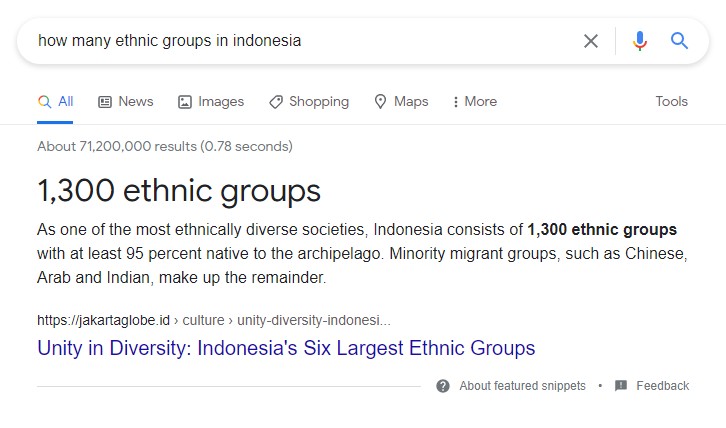
    This is the type of search intent in which users want to get some insight into certain topics. For example, look at what we found for the “how many ethnic groups in Indonesia” query.

    Search intent: Informational
    Informational

    Yes, the feature snippets and other pages show information about that query. One thing that indicates informational searches is when queries contain question words, such as how, what, when, who, and so forth.

    Transactional

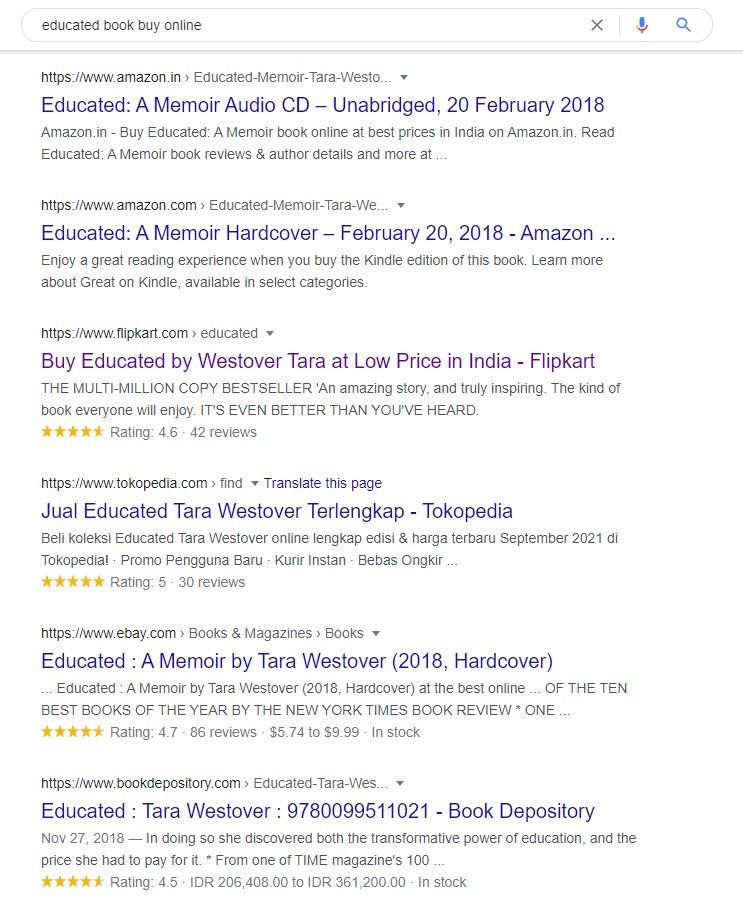
    Every time a user thinks of buying something, he is most likely to use this type of search intent. The search query used in this type usually leads to a bunch of e-commerce lists. However, it is actually more than that. If you want people to sign up or download something from your site, those are also examples of transactional.

    Search intent: transactional
    Transactional

    As you can notice, the SERPs on the picture above provide the results of transactional pages.

    Navigational

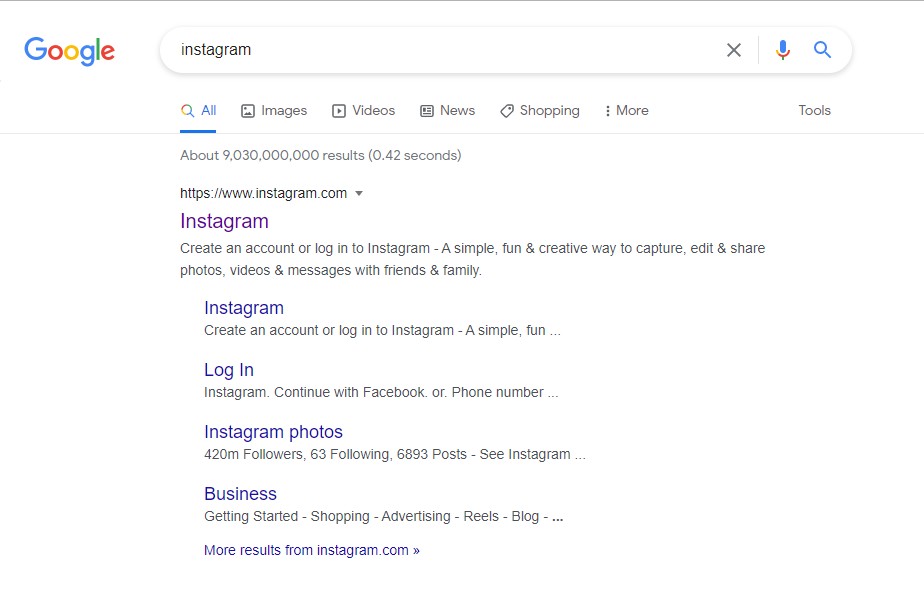
    This is the type of search intent in which the user wants to reach a particular site/brand. For an instance, look at this.

    Search intent: navigational
    Navigational

    In short, we sum up below:
    Informational – know (something)
    Transactional – do (something)
    Navigational – go (to a particular site/brand)

    How to optimize for user search intent?

    First of all, congrats!

    By understanding the precedented information, you have passed half of the journey of optimizing your site. Now, let’s focus on using this knowledge. Remember, your article should provide “the answer” for users. Yet how do users know so?

    Collect data from SERPs

    SERPs are the best place to match search intent. You can start by observing the characteristics of pages that are already on SERPs. Put some attention on what keywords and headlines they used. For instance, you want to provide an article in order to answer the “how to make a lasagna” query. Furthermore, you might want to understand user experience. This is the part you start to analyze.

    Analyze data from SERPs

    Analyzing means the process of finding out why some pages rank higher than others. Back to the previous example, people tend to look for a comprehensive recipe as well as fast to apply. It is perhaps because they are likely to search for the recipe when hungry and want to eat immediately. Thus, you better create a quick tip. If your recipe is 1 hour long while other sites provide recipes that can be ready in just 15 minutes, the users are likely to leave your site. Of course, that is going to make your site rank lower. Thus, it is really important to do an analysis. Good luck!

  • What is Google UTM ?, What is The Function?

    What is Google UTM ?, What is The Function?

    So many Google Analitycs’s users, only a handful of people who can really maximize the features of Google Analytics. One of them is the Google UTM tracking code feature, which is useful as a parameter to track where the source of the clicks and conversions of the website page is coming from, so What is Google UTM?

    What is Google UTM?

    UTM stands for Urchin Traffic Monitor, aka a unique code that is inserted in the URL address of the website. This code serves to identify where your traffic source is getting from. Usually, this code is used by users when sharing their content through various mediums such as email, ads, social media, and so on.

    Google provides a UTM builder feature that you can build through the Google Analytics Campaign URL Builder. You can take advantage of the Google UTM feature as an effective tool to analyze specifically the source of the traffic you get, especially when you are running a certain campaign.

    That way, when you want to run a campaign through various different channels, you can find out which channel is the most effective one to rely on.

    For example, when you distribute three different types of banner ads on several different channels. The first you share through Facebook, the second through email marketing, and the third through LinkedIn.

    Then, you install the UTM tracking code on each banner. Well, when you check traffic in Google Analytics, you can find out which channels actually have the highest click conversions.

    So, you can use only one channel that is most effective and disable banners on other channels. Then, you can allocate the remaining budget from the banner to create the next campaign.

    Kinds of UTM Code Parameters You Can Use

    Google UTM tools can provide flexibility for you in finding out the origin of the traffic obtained through these links. Such as knowing the source of the link information, what content was clicked on, to be additional material to create a new marketing strategy.

    To make it easier to use UTM codes, Google provides 5 types of parameters that you can use

    Campaign

    This code indicates the name according to the campaign or promotion that you created. For example, if your code address is: utm_campaign=50percentpromocode, then the link contains a promotional code with a 50 percent discount offer.

    Source

    This parameter serves to inform where your traffic source is coming from. For example, if you wanted to share a post on Facebook, the parameters to use would be like this: utm_source=Facebook.

    Medium

    This one parameter is used to find out what type of medium visitors use when they click on the link that you share. The medium can be email, ads, browser addresses, social media and others. More or less, this is what the example looks like: utm_medium=socialmedia.

    Content

    The Content parameter is useful for knowing the results of different campaign types within the same URL or as an indicator when you are doing A/B testing. For example, you want to create a first banner with a logo, then a second banner with text. So, to differentiate between the two, you can generate UTM code like this: utm_content=logolink and utm_content=textlink.

    Term

    Term is a parameter used to indicate keywords used in paid ads such as PPC (Pay per Click). For example, when you pay for a campaign for the keyword “online marketing”, then you can add that keyword into the UTM code in the form like this: utm_term=online+marketing.

    Analyzing Traffic Easier with Google UTM

    With Google UTM, you can identify the traffic of each campaign or post in various mediums more effectively. With just a simple addition of code, you can track where your traffic is coming from.

    You can find out which links get the most traffic, examine which content your audience likes the most, or become a supporting solution for doing A/B testing and so on.

    Rad More Article : Sagara Technology Blog

  • Types of Google Ads, Choose According to What You Need

    Types of Google Ads, Choose According to What You Need

    Advertising is one way to promote your product or service. Advertising on Google is one of the marketing strategies that you should try. The chances of your ad being seen by more people are greater. see the article below to find out the types of google ads.

    Google Adwords (Google Ads) 

    Google Ads is a paid advertising service that is displayed on Google search results pages. With a search network campaign strategy, your ads will appear according to searches with keywords that are relevant to your business.

    There are several advantages to using this type of ad. First, ads can be seen by many people. Second, you can define your target audience more specifically.

    If the purpose of your advertising is to increase sales, website traffic, and leads, you can use this type of Google Ads ad.

    Google Display Network

    Google Display Network (GDN) is a type of advertisement in the form of text and images displayed on websites, applications, and mobile games.

    This type of Google ads ad can increase the brand awareness of your business. The reason is that GDN is able to reach 90% of internet users. In addition, the chances of your ad being clicked are also greater. Because, the visual display is more attractive to the audience than just text.

    There are a few tips when advertising with GDN. First, make the ad visuals to be interesting. Second, use the various ad formats available. Make sure you apply it properly so that your business profits increase.

    Google Shopping 

    Google Shopping is a Google advertising service in the catalog that displays more detailed product information. not only displays images and names of google shopping products but also displays prices and online shop links.

    With this Google Ads ad, sales transactions can be done easily. No wonder, Google Shopping is quite powerful in increasing your conversion rate. Interestingly, you are also free to set the budget according to your needs.

    YouTube Ads 

    Google does not only provide image and text format ads. There are also ads with video formats for YouTube. Advertising on YouTube is very profitable because the number of users is the largest in Indonesia.

    YouTube Ads has several types of ads that you can choose from. There are Skippable in-Stream Ads that can be skipped, Discovery Ads that will appear on search results pages to Non-video Ads whose format can be in the form of text or images.

    YouTube ads are suitable for many purposes. Starting from increasing brand awareness, product consideration, website traffic, to leads.

    Google AdMob

    AdMob is short for advertising on mobile. This type of Google ads ad can help you promote products through mobile applications. With Google AdMob, your ad banner will appear in the mobile apps that users are using.

    Google AdMob is multiplatform. That is, it supports various systems such as Android, WebOS, iOS, and Windows Phone.

    One of the important features of Google AdMob is Open Bidding. You can quote ad click prices easily. with Google AdMob you can get a price that fits your budget.

    Choose types of Google ads according to what you need

    each google ad has its own advantages and disadvantages, the best ads are ads that match your marketing campaign. I hope the article about the types of Google ads can help you to choose.

    READ MORE ARTICLE : SAGARA TECHNOLOGY BLOG

  • What is XML Sitemap and why is it important for SEO

    What is XML Sitemap and why is it important for SEO

    An XML sitemap is a file that lists a website’s important pages, making sure Google can find and crawl them all. It also helps search engines understand your website structure. You want Google to find your website and also tell search engines which pages on your site are most important. But sometimes, pages end up without any internal links pointing to them, making them hard to find. A sitemap can help speed up content discovery.

    XML sitemaps have a unique structure, in that they can’t be seen by the end-user, and it’s only used as a way to inform a search engine of the content within a web page on a site, how often the content of the pages is updated, and finally the general importance of the pages in relation to each other.

    Why XML Sitemap is important?

    The search engine will use data from the site map located in a specific place. This is important because if you have a million URLs on your website, you want to make sure that search engines can find you easier to crawl and find your webpages.

    XML sitemaps are recognized by all of the most popular search engines, enabling one single file to be submitted; and when there are changes made to the website, the file can simply be updated as needed. This makes it so that you can improve the content on your website with less effort. And when you employ a sitemap generator, it gets even easier.

    Having XML sitemaps allows search engines to crawl and index a website sufficiently, and allows all search engines to be notified of the site map by inserting it into the robots.txt file.

    In a nutshell, sitemaps enhance the ranking of a website in search engine results, thus boosting SEO efforts. When a website is ranked high on a search engine results page, the website will become visible to a greater number of internet users, it will increasing the traffic to the website. All in all, this is beneficial to both the website creator as well as the user.

    It is best practice when using a single XML sitemap that it be updated at least one time per day if the website changes that often. What is the best practice for using XML?

    1. Include hreflang tags in XML sitemaps
    2. Include the <loc> and <lastmod> tags
    3. Compress sitemap files using gzip
    4. Use a sitemap index file
    5. Use image, video and Google news sitemaps only if indexation drives your KPIs. Sagara Technology
  • A Complete Guide to Create an SEO Friendly Website Structure

    A Complete Guide to Create an SEO Friendly Website Structure

    A good website structure makes it easier for users to navigate as well as good for SEO. On the other hand, without a good structure, your website will appear cluttered and difficult to navigate. Google will also find it difficult to distinguish which content is important and which is not. see the article below to create SEO Friendly Website Structure.

    What is Website Structure?

    Website structure is the arrangement of the important pages on the website. Usually, the structure or architecture of this website will be seen from the main navigation or menu.

    A good website structure keeps the various pages on your website connected to each other. That way, visitors can feel a good user experience.

    that way visitors can easily find the information they need.

    The structure of the website is not only important from the user’s point of view. If you need traffic from search engines, it is also important for SEO or Search Engine Optimization. Because, with a good website structure, Google bots will find it easier to browse your website pages. It also affects the ranking of website pages in search engines.

    Why is SEO Friendly Website Structure Important?

    There are four reasons why you should pay attention to website structure.

    Can Affect User Experience (UX)

    A good website architecture will greatly affect the user experience of your website visitors. Besides being easy to navigate, visitors will also find it easier to find the content or products they need.

    when visitors have a hard time finding the page they are looking for. They will not think long to leave your website.

    SEO Friendly Website Structure Can Provide Sitelinks

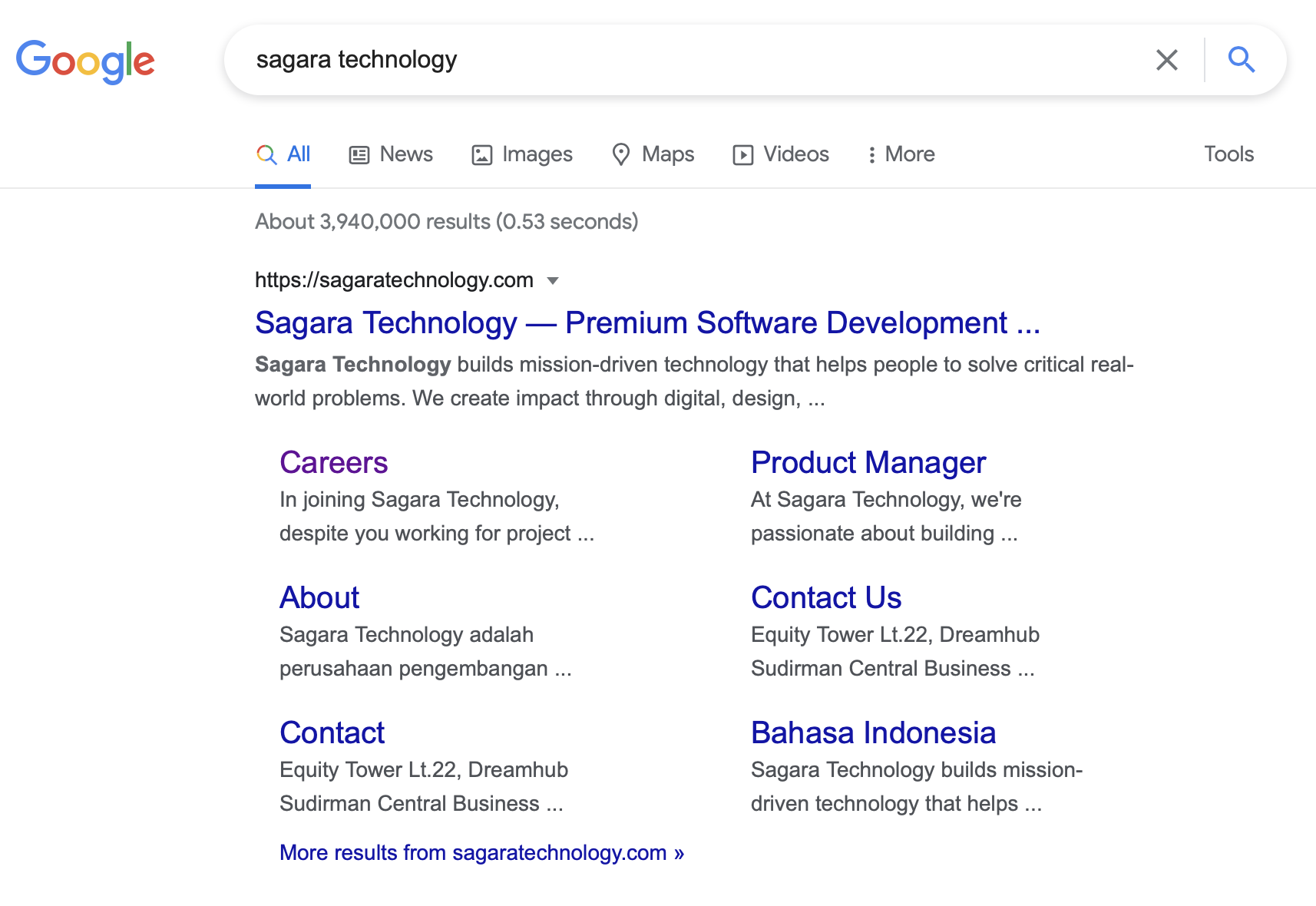
    With a good website structure, you can get site links for websites. A site link is a unique display in Google’s search results. This view shows the homepage link with important pages below it.

    SEO Friendly Website Structure

    Ease from Crawling

    A good website structure can not only help users find the content they need. But it also helps web crawlers to access and find relationships between the content you create. From there, it will be easier for web crawlers to index your content in search engines.

    Avoiding Content Competition from the Same Website

    The structure of the website prevents you from the possibility of competing content (cannibal content). This kind of competition is very detrimental because it reduces the traffic that each content gets.

    The competition in question may occur when you have several similar blog post content. there is content using some of the same keywords for that content.

    Such similar content makes it difficult for Google to decide which content is most important. As a result, your content is competing with each other to be in the top position of Google.

    You must create a good taxonomy structure and internal links. So the content is more clearly related and does not compete with each other.

    How to Create an SEO Friendly Website Structure?

    Plan ahead

    Try writing down all the content ideas you want to include on your website. Then, group all of that content into more general categories. Then arrange them all so that they are interconnected.

    For example, you want to use a hierarchical structure. You just sort the content to form a pyramid.

    Pay attention to the page links on the homepage

    The homepage is at the top of the website structure. That means, the homepage becomes the first page that visitors access before going to other pages.

    That’s why you need to link some of the most important page links to the homepage. That way, the chances of visitors opening important pages are greater. They will also find information more easily.

    Create Clear Navigation

    To have a well-structured homepage, you need to create clear navigation. There are two types of navigation that you can add to your website, namely menus and breadcrumbs.

    Use Taxonomy

    To make your navigation more organized, try using the existing taxonomies system in WordPress or other CMS. Taxonomies are used to group content by category or tag. So, visitors can more easily find other articles on the same topic.

    Don’t Forget Internal Links!

    Maybe you have started to understand that website structure relates to content categorization and links to related content. Therefore, now is the time to learn how to use internal links.

    Internal linking is a term for linking content on your website. This internal link cannot be done arbitrarily. The two linked pages must have related topics.

    Manage Your Website Structure

    A content audit means if you have an article that is out of date, you should update it and then republish it. For example, there are articles that have never been visited, you might consider deleting them.

    But remember, don’t carelessly delete pages or articles! Because, if Google can’t find the page because it’s been deleted, then your user will get a 404 error page. If that’s the case, the SEO of the website will be bad.

    To prevent that from happening, you need to redirect the URL of the page that you deleted. By redirecting the page, instead of finding a 404 error page, your users will find another relevant page.

  • Google Search Console: What Is GSC Used For?

    Google Search Console: What Is GSC Used For?

    What is Google Search Console?

    Google Search Console (GSC) is a free tool provided by Google to measure your website performance, traffic, keyword performance, analyze issues on your website. It also provides an insight on how your website doing in organic search as well as ways to make an adjustment to the site in the Google Index.

    For SEO, Google Search Console is a must tool for adjusting strategy based on data. The data that you can get from Search Console can help businesses discover new ranking opportunities, boost existing performance, and learn how exactly people are coming to their website by their search intent.

    What are the GSC used for?

    Google Search Console provides you a performance report metrics about organic traffic coming to business websites as well as each individual URL. It gives details about clicks, impressions, click-through rate, and average keyword rankings.

    1. Impressions: This is defined as how many links to your site a user saw on Google search results . A simpler way of describing it is that impressions are how many times your site appears in search results, even if they don’t get clicks. Your results aren’t counted as impressions if they appear on the next page of search results that the searcher did not click on.
    2. Click Through Rate: This metric is a measure of how many clicks the site has received, divided by the number of impressions received.
    3. Clicks: This metric reflects the number of clicks from Google search that results in users visiting your site’s property. Unlike Google Analytics these clicks don’t necessarily represent user’s sessions (a total period where a user browses the site) or even page views (the number of times a page is viewed in total). Clicks are, just that… clicks. This is a big part of why the number of clicks you see in Search Console doesn’t always match with sessions you see in the landing-page report of Analytics; because Google measures these metrics with slightly different definitions.
    4. Position: This means the average position of the topmost result from your site for a given keyword. Average is given here because the position fluctuates often, give or take a few spots.

    Google Search Console also provides to check your technical site’s health, what are the component of site health you should aware of?

    1. The Index Coverage Report
    2. The Sitemaps Report
    3. URL Inspection Tool
    4. Manual Actions Report
    5. Removals Tool
    6. Core Web Vitals Report
    7. Mobile Usability Report

    All these reports are just a few of the main resources available in Search Console. Depending on what sort of business you own and how your website is set up you might have other reports available to you. Read More Here