Author: Sagara Technology

  • Introduction to Customer Relationship Management (CRM)

    Introduction to Customer Relationship Management (CRM)

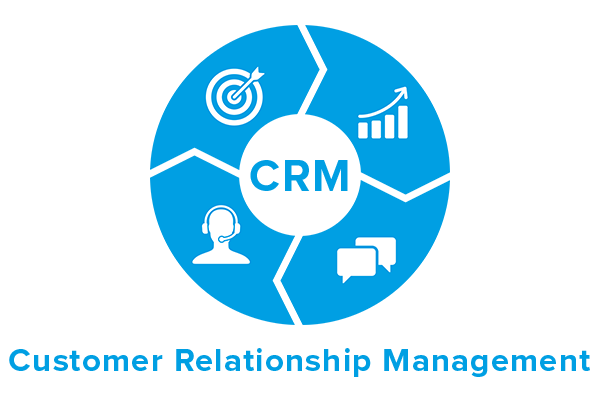
    Here’s the introduction to Customer Relationship Management (CRM). CRM is an approach to manage a company’s interaction with current and potential customers. CRM uses data analysis about customers’ history to improve business relationships. Specifically, it focusing on customer retention and ultimately driving sales growth. One important aspect of the CRM is the systems of CRM that compile data from a range of different communication channels, including a company’s website, telephone, email, live chat, marketing materials and more recently, social media.

    Definition

    In definition, Customer Relationship Management (CRM) is the combination of practices, strategies and technologies that companies use to manage and analyze customer interactions and data throughout the customer lifecycle, with the goal of improving customer service relationships and assisting in customer retention and driving sales growth. CRM systems compile customer data across different channels, or points of contact between the customer and the company, which could include the company’s website, telephone, live chat, direct mail, marketing materials and social media. Also, CRM systems can give customer-facing staff detail information on customers’ personal information, purchase history, buying preferences and concerns.

    Evolution of CRM

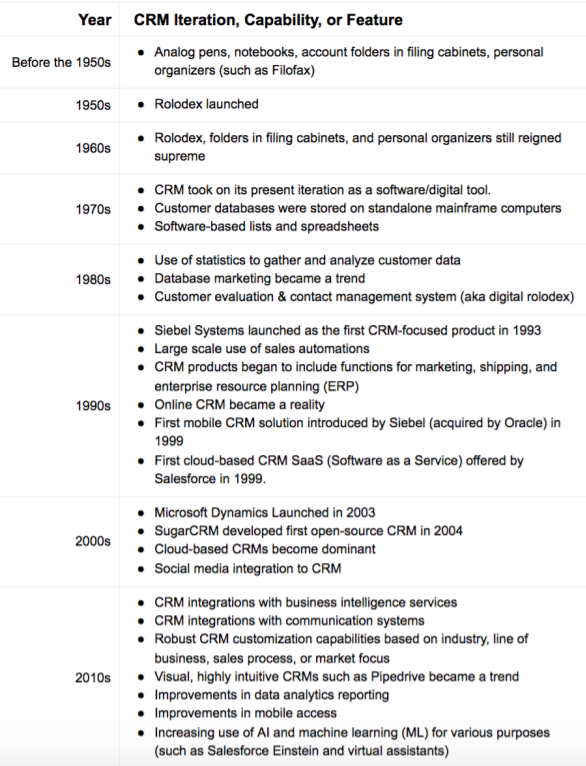
    Let’s see the evolution of CRM. Business people started using the term Customer Relationship Management (CRM) since the early 1990s when the concept of business started to change from being transactional to relational. CRM directly contributes towards customer benefits and the growth of businesses.

    It’s no secret that customers and customer satisfaction drive the growth of your organization. Let’s take a look at how their CRM journey has progressed from being a mere necessity for data entry to becoming a boon for their business.
    1950s

    At that time, businesses recorded their day-to-day tasks on pen and paper. Later in the year 1956, the first rolling index or Rolodex was invented to store contact information of business prospects. 

    1960s

    Most businesses reached out to their customers by scheduling on-ground meetings. Sales executives would sell products either by engaging with people in one-on-one sessions or cold calling.

    1970s

    In 1970s, database marketing enabled businesses to customize communications to their customers with targeted messages and monitor business relationships as they progressed, on a screen. In this era, CRM took on its presents iteration as a software/digital tool.

    1980s

    In the year 1987, a digital version of the Rolodex called ACT! by Conductor Software launched. It had a contact management tool built-in and paved the way for Content Management Systems or CMS prototypes to be developed.  ACT! earlier known as Activity Control Technology and later renamed as Automated Contact Tracking before settling on the acronym.

    1990s

    In 1990, Database marketing has expand its set of features like tracking and analyzing customer data while allowing trivial tasks to be automatic, transforming itself into Sales Force Automation (SFA). In 1993, Tom Siebel left Oracle and founded Siebel Systems. His company took the lead and became the most popular SFA provider at that time. In 1999, Tom’s company released the first mobile CRM called Siebel Sales Handheld into the market. It was also the year that SalesForce launched the first cloud-based CRM as an affordable alternative to on-premise CRM.

    2000s

    Around 200s, thankfully, Paul Greenberg’s book titled ‘CRM at the Speed of Light’ managed to shift the conversation to a more coherent CRM system as a solution. Shortly after the launcs of first-ever open-source CRM by SugarCRM in 2004, Vtiger also launched an open-source CRM in the same year.

    2010s – Modern CRM Systems

    After 2000s, in 2010s, CRM solutions are now fully equipped to manage sales pipelines and deliver outstanding customer experiences for small businesses, mid-size enterprises, and large multinational corporations. Modern CRM tools can project pragmatic sales forecasts for every quarter and can be integrate with social media platforms.

    Need and Importance for Customer Relationship Management

    • Customer Relationship Management leads to satisfied customers and eventually higher
      business everytime.
    • Goes a long way in retaining existing customers.
    • Can ensures customers return back home with a smile.
    • Improves the relationship between the organization
      and customers. Such activities strengthen the bond between the sales representatives and
      customers.

    Future of CRM

    CRM is now among the fastest-growing sector in Software as a Service(SaaS) space. With each innovation, CRM systems are moving the needle towards customer satisfaction. in the future, breakthrough technologies such as Artificial Intelligence and Machine Learning will help your sales team shift their focus from identifying prospects and pushing products to care for the customer. It’s only a matter of time before the barriers between your sales, marketing, and support teams entirely breakaway to provide a holistic roadmap for your business growth. More Here


  • Most Popular CMS, 5 Best Platform You Can Use

    Most Popular CMS, 5 Best Platform You Can Use

    What is a CMS?

    CMS (content management system) is a piece of software that allows you to easily manage content and create a website. Usually, web pages are written in HTML, JavaScript, and CSS programming languages. But if you use CMS, It allows you to generate, manage, and edit website content without requiring specialist technical skills.

    Popular and Best CMS Platform Recommendation:

    1. WordPress

    WordPress is one of the CMS and it’s free to download and use. However, creating and uploading your WordPress website requires the purchase of a custom domain and hosting. WordPress offers plenty of features and capabilities to allow just about every company to set up their site quickly and it is also SEO friendly.

    The pros of using WordPress :

    1. SEO Friendly feature
    2. Mobile Friendly
    3. User Friendly
    4. Easy for blogging
    5. E-commerce functionality

    2. Joomla

    Joomla is a CMS for many types of websites. It was first released in 2005, so like WordPress, it’s been going for years. Joomla has plenty of features and offers a 1 click installation. However, it’s really an ideal CMS platform for developers and experienced website creators, so it’s not such a good option for beginners.

    The pros of using Joomla :

    1. SEO Friendly feature
    2. Mobile Friendly
    3. User Friendly
    4. Easy for blogging
    5. E-commerce functionality

    3. Wix

    Wix is one of many website builders designed for the complete beginner. It’s also fully hosted, and Wix manages all the technical details. Wix is best suited for solo entrepreneurs or small businesses of any type. But, eCommerce and blogging capabilities are not as good compared to WordPress

    The pros of using Wix :

    1. SEO-friendly features (better in recent years)
    2. Mobile-friendly features
    3. User-friendly
    4. Blogging functionality (not as advanced as WordPress)
    5. eCommerce functionality

    4. Shopify

    Shopify is leading in the eCommerce space. Unlike the first three popular CMS platforms, it is a software as a service. You pay the platform a fee to manage your store technical details such as hosting, SSL certification, security, and other functions for your store.

    The pros of using Shopify :

    1. SEO-friendly features
    2. Mobile-friendly features
    3. User-friendly
    4. Blogging
    5. eCommerce functionality

    5. Drupal

    Like WordPress and Joomla, Drupal is free, open-source software. but you will require a custom domain purchase and installation on your hosting server. The software also offers themes and modules that allow you to customize your website’s features and functionalities.

    Drupal is a good option for developers, or for people able to hire a developer. It’s very useful if you’re aiming to build a highly customized site that needs to handle a lot of data.

    The pros of using Drupal :

    1. SEO-friendly features
    2. Mobile-friendly features
    3. Blogging functionality
    4. eCommerce functionality

  • How to Improve Web Analytics

    How to Improve Web Analytics

    Web analytics is the process of measuring and analyzing traffic statistics or traffic on a website. Generally, every business performs some data analysis, and it is used to determine sales, profits, loss rates and market interest. However, in terms of building a strong e-presence, you need tools that can be used to collect the data needed to promote your site.

    We may use Web analytics to see how effective our marketing campaigns were, identify and fix flaws in our online services, and construct customer profiles to increase the profitability of our advertising and sales activities. The ability to interpret and use data offered by consumers, rivals, and partners is critical to every successful organization.

    What Is Web Analytics and How Does It Work?

    On the page, most web analytics solutions will add code, usually in JavaScript. The web analytics tool will use this code to track each page’s receiving or clicking on a link. Other information, such as the device, browser, and geographic location, may be collected by this code (via IP address). Online analytics websites commonly use cookies to track individual sessions and discern repeat visits from the same browser.

    What Is the Importance of Web Analytics?

    Web analytics delivers statistics in the form of information that may improve the user experience for visitors to a website. We can optimize our website to get the conversions we want by understanding user behaviour. Web analytics, for example, could show the most popular pages on your website, and you could then add shopping links to these sites.

    Tools for Website Analytics

    Google Analytics

    Google Analytics is a free Google service that displays statistics on website visitors. However, Google Analytics can track visitors using information from referring pages, such as search engines, advertising, pay-per-click networks, email marketing, and links in PDF documents.

    Furthermore, when using AdWords, it can evaluate the success of AdWords ads on Google. The following are some of the features present in Google Analytics:

    • Its purpose is to see visitor on the website in real time
    • The function of the audience is to observe the audience in terms of demographics, interests, location, behavior, browser, operating system, and device, among other things.
    • Acquisition’s job is to keep track of all website traffic, as well as Google advertisements, search console, social media, and campaigns.
    • The purpose of behavior is to see how our website performs in terms of content, speed, search, event, and publisher.
    • Website goals, e-commerce, and multi-channel funnels all fall under the category of conversion.

    Crazy Egg

    Crazy Egg makes use of Heatmap technology to show what site visitors are doing on a Web page. This tool displays where visitors move their mouse and click on the page. These tools are not free; instead, they come in a variety of price bundles.

    Metrics

    Spring Metrics is a straightforward online analytics program. You’ll get real-time analytics and conversion data using Spring Metrics. There are also services for determining the best conversion sources, keyword research, landing page research, and email performance reports.

    Kissmetrics

    Kissmetrics is a web analytics application that allows you to track individual visitors’ movements across web pages. You may monitor how behaviour evolves, uncover patterns, and view the most common and recent referrals, among other statistics, using Kissmetrics.

    Woopra

    Woopra is a web analytics application that allows you to track analytics in real-time. However, Woopra is a live visitor statistics program that tells you where your visitors are from, what page they’re on, where they’re on the site, and what browser they’re using.

    In addition, Woopra can also engage in live chat with any site visitor. This can be a useful tool for interacting with customers on an e-commerce site. Furthermore, Woopra has a restricted free plan as well as several paid plans.

    Best Practices in Web Analytics

    Qualitative research and testing findings can be greatly aided by web analytics. The following are some recommended practices to remember in this field:

    Encourage a data-driven decision-making

    Find out what you can do to enhance your KPIs after gathering the necessary data to determine whether you have reached (or failed to meet) your objectives. Is there any high-value content that isn’t generating any traffic (based on user input to the website)? Use user path analysis or engagement analysis of top sources for that page to figure out why. Use the tools for experimentation and testing to try out alternative options and determine the optimum placement for that page that creates the most engagement.

    Don’t only give traffic reports

    Visits, pageviews, top sources, and top pages are only the tip of the iceberg. Large figures might be deceiving; just because there is more traffic or time spent on the site does not imply success. Reporting these figures is mostly for show; after all, what does 7 million visitors have to do with your program’s success?

    Always provide data with insights

    It’s pointless to report analytics to your stakeholders without insights or connections to your company or user goals. Demonstrate how the website data reveals areas of success and improvement to make the data relevant and meaningful.

    Avoid being too snapshot-focused

    The richer and more sophisticated web experiences currently happening online are not captured by focusing on visits or examining solely inside a given time period. Pan-session metrics, such as visitors, user-lifetime value, and other values that provide a longer-term understanding of people and users, allow you to assess how well your website performs as it matures and interacts with visitors, particularly repeat visitors.

    Communicate with stakeholders clearly and concisely. Be consistent in the information you present, understand your audience, and be aware of your system’s flaws, which you should report to your stakeholders.

  • How to Improve Website Speed

    How to Improve Website Speed

    The slowest loading of the website is one of the things most website owners avoid. Not only website rankings but visitor satisfaction will also be affected. Therefore, you should always check the speed of the website by unifying and optimizing its overall performance.

    How Slowness Destroys Your Website

    Before we go into the how-to, let’s talk about what’s so horrible about a sluggish website. After all, what are a few extra seconds worth? Isn’t it true that people no longer have time? They don’t, as it turns out.

    It raises the bounce rate

    People are more likely to abandon a website that takes too long to load. According to a Google study, the slower your site is on mobile, visitors bounce more likely. As you can see, even two seconds can make a significant difference, and four seconds can double bounce rates. Finally, if you want users to stay on your site, make it as fast as possible.

    Lowers Conversion Rates (Less Money)

    In addition to the foregoing, increasing the speed of your website has an impact on conversions. For example, Portent discovered that reducing page loading time from two to one second can double income for e-commerce businesses.

    Lowers the search engine ranking (Less Organic Traffic)

    Because site speed is important to users, Google considers it when ranking websites. This has been the official policy since 2010, and it now includes mobile devices.

    The latter is even more crucial now that Google has transitioned to a mobile-first index to keep up with modern web usage. That is, websites are ranked based on the performance of their mobile versions, not their desktop versions. This includes non-mobile website versions, and it’s a full 180 from the previous situation.

    As a result, if your site loads slowly on mobile, it will negatively impact your overall search ranking, not just in mobile search. While Google claims that this only affects the slowest websites, site speed impacts bounce rates, time on site, and other metrics that search engines consider.

    Furthermore, because crawl bots are on a budget, a slow-loading page may harm crawling. As a result, you may notice that Google indexes less of your pages.

    1. Detracts from the user experience

    Everything above boils down to one thing: the user experience. If it’s awful, it’s bad for your site; if it’s good, it’s good for your site. Site speed can even determine whether or not a website is useable by your target audience. One of the most spectacular examples of this is from YouTube’s early days.

    The time it took users in Asia, South America, Africa, and other remote locations to start watching a movie was decreased from 20 minutes to 2 minutes when the page weight was lowered from 1.2MB to 100KB. As a result, it created entirely new markets.

    Although online architecture has vastly improved since then, the premise remains valid. To summarize, if you want to keep people on your site, increase conversions, rank well in search engines, and keep visitors happy, you must give an excellent speed experience at all times and on any screen size.

    Step to Improve Website Speed

    Perform a website performance test.

    Website speed testing determines how well a website performs. Testing a website regularly can aid developers in detecting performance degradations or enhancements. A speed test should also assist developers in identifying some or all of the places that are holding down website performance, as well as where improvements may be m

    There are numerous high-quality site speed tests available, many of which are free. WebPageTest.org (a Cloudflare partner) offers some free tests and thorough reports on how quickly various elements of a page load. Developers can also use WebPageTest.org to test websites on a variety of devices and network connection speeds.

    Get a web hosting service that is both quick and dependable.

    Good hosting is the foundation of a speedy website. No matter how hard you strive to provide the finest user experience, your website’s speed will suffer if your hosting is inadequate.

    The top hosting firms handle everything, so you don’t have to know what’s going on behind closed doors. There’s a lot a hosting service can do to increase the speed of your site, from high-quality, well-maintained hardware to routinely updated software components.

    Use a content delivery network (CDN)

    By caching content in many places around the world, CDNs help websites load faster. The cache servers of a CDN are usually closer to end-users than the host or origin server. Requests for material are sent through a CDN server rather than directly to the hosting server, which may be hundreds of miles away and connected to many autonomous networks. The use of a CDN can drastically reduce website load times.

    Google also has a PageSpeed Insights tool that allows you to test your website’s speed in depth. The Network tab in Google Chrome DevTools can also assist developers in evaluating their site’s performance; it displays all HTTP requests, the size of requested assets, and the time it takes for requests to be fulfilled.

    CSS and JavaScript files should be compressed

    CSS and JavaScript files are commonplace on modern websites, and they work together to keep web pages looking pleasant and working in users’ favour. Line after line of code increases the size of those files unnecessarily, slowing down your site.

    Web designers (the same folks who create the themes you eventually buy) want to keep their code tidy. This means that they keep the code tidy and easy to understand. White spaces, excess lines, and characters, on the other hand, add to the file’s weight, which may be readily reduced by minifying.

    Clean and optimize the WordPress database

    A database is required for your WordPress website to function. There is a backup of everything you do and have on the site. As you may expect, themes and plugins don’t always keep your database clean, so even if you delete a certain plugin, some data will remain in your database. The database will get congested and inefficient over time, causing the website to load slowly.

    Although it is feasible to clean out the database manually, this requires knowledge of how it operates. Even if you do, there’s a good possibility you’ll make a mistake.

    Fortunately, there are free WordPress plugins that can optimize and clean your database. However, before you do anything, make a comprehensive backup of your website or ensure that you have a mechanism to roll back modifications. Even though WP-Optimize is a well-known and secure plugin, directly altering a database can go wrong at times.

    So, if something goes wrong, I recommend using WP Reset. This plugin will take a snapshot of your site and allow you to undo any changes you’ve made quickly. As a result, if something goes wrong, you may restore your database in a matter of minutes rather than having to restore a full backup, which can take a long time.

  • Benefits of Making Website Loading Faster

    Benefits of Making Website Loading Faster

    A website loading faster is a collection of information in the form of web pages in one domain name and can be accessed through a web browser. Websites have various functions depending on the type. Some are useful for finding the latest information such as media portal websites, for expanding friendships such as social media, even for buying and selling transactions such as marketplaces and e-commerce

    User’s activities to access the website will certainly be hampered if the website performance is slow. Slow-loading websites make visitors feel uncomfortable and eventually move to other websites. If you have a website, make sure you optimize the performance of your website so that it loads faster. There are several benefits if you make your website load faster.

    Advantages of Having a Website Loading Faster

    1. Make Users Comfortable

    When someone accesses a website with slow loading, they may immediately leave the website and move to another website that performs faster. Conversely, if a website has a fast performance, this will give the impression of being comfortable and attractive to visitors. So, the potential for increasing the amount of website traffic will be even higher.

    Visitors also wouldn’t mind exploring other content on the website. The more visitors who explore website content, the bounce rate will also decrease. Bounce rate is the percentage of visitors who leave the website after visiting just one page. The lower the bounce rate, the better the quality of the website, both in terms of content and performance.

    2. Be on the Top Rank of Google

    Some SEO experts say that website speed is currently one of the factors that can affect rankings in Google Search. For this reason, making fast website performance is very important so that Google prioritizes it to enter the first page of Google. Even so, speed is certainly not the only thing. However, the quality of the content should be paid more attention to.

    3. Increase Sales

    Do you have an online store website? Someone who just visited your website doesn’t necessarily make a transaction right away, right? He will look around first, explore your website, then consider.

    Imagine if your website is slow, surely that user will not be comfortable and look for similar products on competitors’ websites. In other words, you lose potential buyers.

    This is where the importance of making a fast-loading website is. The more visitors who are comfortable exploring your online store website, the greater the opportunity to increase sales.

    Tips for Making a Fast Loading Website

    How to surmount a website that takes a long time to load? There are various ways that can be done such as reducing image size, reducing unnecessary Plugins, minify Javascript, and choosing the right hosting service.

    The quality of hosting really determines the performance of the website. If you have a slow website, please check again, maybe the problem is with the hosting you are using. If so, then you should choose a hosting that is equipped with speed features such as LiteSpeed Web Server and WordPress Accelerator.

    The LiteSpeed feature is a web server that can optimize website speed without changing pre-existing configurations, programs, and operating system details. Whereas, WordPress Accelerator is a feature provided by WordPress Management. The WordPress Accelerator feature is designed to increase the speed of website performance automatically and is easy to operate.

  • The Definition of HTML and CSS

    The Definition of HTML and CSS

    Sagara Technology – HTML or Hypertext Markup Language and CSS or Cascading Style Sheets are the main core technologies for build Websites. HTML can be describe as the skeleton of a website, while CSS is the skin of a website and basically all visual aspects of a website. HTML and CSS are the basis of building Web pages and Web Applications.

    What is HTML?

    HyperText is effectively a text within a text and a markup language. It is a language understood by computers, designed to essentially describe webpages and make the text you use more interactive.

    HTML is the language for describing the structure of web pages to search engines. HTML gives authors the means to:

    • Publish online documents with headings, text, lists, photos, etc.
    • Retrieve online information via hypertext links, at the click of a button.
    • Design forms for conducting transactions with remote services, for use in searching for information, making reservations, ordering products, etc.
    • Include spread-sheets, video clips, sound clips, and other applications directly in their documents.

    Primarily, HTML is use for creating the pillar content of a webpage, giving it structure. You start by writing words, then apply tags or elements to these words. Then the web browser can read this and understand which was the heading of a page, paragraphs, and where the page starts and finishes.

    What is CSS?

    CSS or known as Cascading Style Sheets is basically the skin of a website. It is a sheet-style language, which is a type of language you can use to describe the presentation of a markup language. Generally, it allows for granular control for style elements like the header, footer, navigation, and all the visual aspect of your website. Without it, websites would be plain text on white backgrounds.

    CSS was invented in 1996 in order to make sense of HTML and make the webpage looks better in all design aspect.

    CSS allowed several innovations to webpage layout, such as:

    • Specify fonts
    • Specify color
    • Specify size of text
    • Applying colors

    There are many other coding languages out there, such as JavaScript, Backend programming language, C++.

  • Know-How Trojans Work and How to Overcome Them

    Know-How Trojans Work and How to Overcome Them

    Have you ever had your smartphone suddenly stop working? You know, the Trojan has taken control of your phone and stolen your sensitive data. what is it?, how do trojans work?.

    What are Trojans?

    Trojan Horse is malware that is good at hiding. The scary thing is, this malware can steal and mess up data and systems on the victim’s device or website.

    I wonder, why is it called a Trojan Horse?, The term Trojan Horse adapts Greek mythology, namely the Trojan War.

    It is said that the Greek troops succeeded in winning the victory because they infiltrated a large wooden horse (Trojan horse) which was paraded by the Troy army as a celebratory trophy. When the Troy army was caught off guard, the Greeks attacked.

    How Trojans Work

    The way the Trojan works is quite simple. because it is simple, many people are trapped by this malware. The reason is, the Trojan is able to disguise itself as software that is difficult for you to distinguish from the original.

    Here’s how the Trojan works:

    1. Hacker sends bait to target. For example: PDF files, specific links, software, etc.;
    2. The target accepts the feed, then clicks on the file they receive;
    3. The Trojan is active, then sends all the info the hacker wants from the device or website;
    4. Hackers will control the system and perform various criminal acts;
    5. Infected devices and servers can transmit this malware to connected devices and websites.
    6. This malware is only active when you invite it into your device. So in conclusion, the Trojan needs the help of the victim to be able to act.

    How to Overcome Trojan Attacks

    After knowing the dangers of trojans, you must be more concerned about trojan, these are some tips for dealing with trojan :

    1. Install the Best Antivirus
    2. Beware of Foreign Emails
    3. Avoid Clicking Suspicious Pop-Ups
    4. Ensure Only Download from Official Site
    5. Use a Safe Internet Network
    6. Use Hosting with Strict Protection
    7. Regularly Update the Operating System and Software
    8. Perform Backups Regularly

  • AI Marketing: A Technology Breakthrough In Digital Marketing

    AI Marketing: A Technology Breakthrough In Digital Marketing

    Artificial Intelligence (AI) might be one of some popular subjects in the field of machine learning and technology. Moreover, we often find this phrase when we watch sci-fi movies, some tech advertisements, and many more.

    In a simple way, AI is a system that can perform tasks that require human intelligence. Which means tasks that include problem-solving, diagnosing, and recognizing emotions and human behaviors.

    This system works on the background of popular products and services, such as Netflix, Amazon, Google, and some e-commerce. We are able to find recommendations based on our liking with the help of AI.

    Now, AI has paved its way into marketing. AI helps brands to get more insights and reach more desired customers. This is an effective way to do marketing since it is more affordable and accessible for all.

    So, what does it mean by using machine-learning applications in marketing?

    AI Marketing: The Definition

    Just like its name, artificial intelligence (AI) marketing is a collaboration of AI and marketing that brings the best practices to maximize marketing by using technology. This method has a goal to improve marketing campaigns as well as the customer journey. 

    AI marketing uses big data analytics, machine learning, and other processes to gain insight into the target audience. Marketers can create more effective customer touchpoints.

    The best result of this marketing method is that it can operate autonomously, placing the right kinds of ads in front of the right kinds of people based on complex algorithms and big data.  By targeting and delivering the right advertisement to the right audiences, marketers can make the most out of their methods.

    With AI, businesses can optimize their return on investment by only placing ads in front of relevant viewers. Ads can be bought automatically, then personalized at scale. Many advertisers are already using this technology.

    AI And Digital Marketing

    Artificial Intelligence in AI marketing can help to make decisions based on data collections and data analysis based on the audience and current trends. This marketing campaign optimizes the speed of extracting insight from raw data while also eliminating the risk of human error. 

    AI tools use data and customer profiles to learn how to best communicate with customers, then give them particular messages at the right time and with high efficiency.

    AI Marketing: The Components

    Artificial intelligence holds a vital role in helping marketers connect with consumers. There are some components that uphold AI marketing to reach its highest potentials and deliver the best advertisements for clients.

    Machine Learning

    Firstly, machine learning involves computer algorithms to analyze information. This part of AI can improve automatically through experience. 

    Big Data and Analytics

    Big data has provided marketers with a large amount of data that needs to be processed and extracted. It’s not easy to determine which data is the best at describing consumers’ behavior and the latest trends. So, it’s important to use analytics to understand the data and get valuable insights from them.

    AI Marketing: The Challenges

    The huge abundance of data can also be a challenge to marketers. The ability to make real-time, data-driven decisions is the qualification that makes AI the forefront for marketing stakeholders.

    Finally, with the help of machine learning, AI marketing can be a great way to introduce the brand to the society

  • Applications of AI in Fintech: 5 Essential Examples

    Applications of AI in Fintech: 5 Essential Examples

    Fintech is the technology we use to advance the financial industry. It is a new kind of technology that seeks to improve the use of financial services. With AI, Fintech grew quickly with the help of various applications of AI.

    By using AI to analyze big data trends, we have the potential to help companies to achieve their goals. Therefore, it can also reduce operational costs and improve internal processes efficiency.

    In this article, we will get to know five applications of AI in the field of fintech.

    Digital Financial Advisor (Automated Financial Coach)

    In finance, we use automated/digital finance assistants to offer financial advising services for users. This technology also helps assist users in making financial decisions.

    Often called “Robot Advisors”, these systems will help users to keep track of events and price trends, adjust their financial plans, savings, and also spending. This way, users can make better financial decisions based on recommendations.

    An easy example is transactional bots. For instance, their usage is growing fast and have become one of the most popular cases in AI across all industries.

    This review for one of the digital financial advisor might help you through how does this thing really works.

    Insurance Management

    With the help of AI, insurance management will automate the process and provide more accurate information. This will help to make better decisions for the customers.

    By linking several data sets, automated agents can speed up the process and assist the users in listing the insurance requirements. 

    In addition, this technology can describe risk levels based on the users’ activities. This application of AI in insurance management will tell us if there will be any risks or problems.

    Not only that, there are some other benefits that we’d get like reducing the costs and speeding up the process of drawing conclusions.

    Decision Making

    At this time, Fintech apps are developing new ways to change data into simple insights for users. This way, they can use those results to improve their decision making.

    Insurance leaders and banking agents use AI to lower the cost of extracting data. FinTech apps are able to ask the right questions and analyze the data.

    With the help of AI, stakeholders can improve the quality of their judgments by making data-driven decisions that will give more benefit to people.

    Customer Support

    One of the AI applications that we often discover online is bots. Hence, FinTech companies use this technology to solve customer issues by interacting directly with users.

    This way, chat bots allow companies to reduce costs while still keeping customer’s satisfaction.

    In the future, customer support in the form of mobile applications will become more common. This means that we will need this technology to solve customer issues and improve customers’ experience.

    Now, we are moving from physical activities to online. We also turn the casual conversations between customer services and us into technology based communication. We often find it as a chat box and personal assistant.

    With the help of AI, those “artificial” conversations are delivered in a more human-like way. AI will learn to provide customer service and expert advice at a low cost.

    Forecasts

    Technologies like artificial intelligence and machine learning have their own ways to calculate huge data and translate them into simple results.

    However, these apps still have the power to keep the work with lower cost while keeping the quality of the data. This will help users to track their spending and receive personalized financial insights.

    How about the forecast?

    With the help of analysts, a massive amount of data can help companies to find patterns and then predict the future through data extraction and data mining.

    These results insights can help us to predict what will happen next. Finally, we can predict what the customers are going to buy, what are going to be trends, etc.

    Those are the five applications of artificial intelligence (AI) to FinTech.

    In conclusion, we can learn that AI can help FinTech to survive the times in many conditions. To sum up, you can watch videos about 5 advanced technology in the future here.

  • What is GDPR? Is it Applicable in Indonesia?

    What is GDPR? Is it Applicable in Indonesia?

    What is GDPR ?

    GDPR is a regulation regarding the protection of personal data that applies to all individuals, companies, or organizations in the world that store, process, or process personal data of residents of the European Union.

    The purpose of the enactment is so that personal data obtained by entrepreneurs. is not misused by irresponsible parties.

    Do GDPR Applicable in Indonesia?

    GDPR is a regulation on data protection (data privacy). Users’ personal data may not be used in any form without their permission.

    This is mandatory for all persons worldwide who process, store, or process personal data of residents of all European Union (EU) countries.

    So, if you are an Indonesian citizen and have a website that is publicly accessible and collects personal data in the form of cookies, these rules apply to you as well.

    It doesn’t matter whether the website is an online store, a portfolio website, or a personal blog, as long as the website is accessible to EU citizens, you are required to be it-compliant.

    What Does the Regulate?

    The main thing is the privacy rights of EU netizens which require website owners to maintain their privacy properly. 6 main principles to pay attention to

    1. notification when the website is hacked
    2. Right to Access Data
    3. Right to Deletion
    4. Data Transfer
    5. Privacy Becomes the Main Focus of the System
    6. There is a Data Protection Officer

    Impact of the GDPR

    GDPR is a relief because they don’t have to worry about the misuse of personal data.

    Your website must be GDPR compliant. Otherwise, you can get a fine of up to 4% of your annual income or €20 million (approximately IDR 324 billion). Depending on which of the two is greater. Wow!

    What if you are an Indonesian citizen who does not live in the EU? The answer: it makes no difference. It still applies in Indonesia if your website manages data from EU netizens.

    you don’t have to worry about GDPR, as a website owner, you just need to understand the six basic components and practice the steps to comply with its rules.