Author: Sagara Technology

  • What is CTR? Here some Tips for Information

    What is CTR? Here some Tips for Information

    Just being on page 1 of Google is not enough. The audience must enter your page, if your website visitors are still few, it means your CTR is still low, to get high engagement, you need a high CTR too, what is CTR?.

    What is CTR?

    Click Through Rate (CTR) is the number of clicks to the number of impressions. While the impression is the number of appearances of your website page in Google search results. in analogy, the google page is the market, the store is the website, the people who come to the market are the impressions. The CTR is the number of people who enter the store to all the people in the market.

    Optimize CTR

    Getting high organic CTR is difficult. There are many ways to increase CTR that you can practice right away. Below are effective ways to increase your organic CTR.

    Audience Reasearch

    The most common mistake that website or blog owners make is not understanding the audience they are trying to reach. Often the author determines the topic to be written based on subjective judgment alone, without considering what the reader wants.

    Audience research is very important, imagine if you walk meat in a fruit market, people will be confused and will not buy, just like Google page. People will not click on our website even though the search volume is high.

    Adjust the meta title meta description with keywords

    Google only displays the title and meta title on the page, this shows that what must be optimized is the title and meta title. Create an attractive title and meta title and contain the intended keywords. don’t write too long title and meta title. Limit the meta title to no more than 130 characters, because if it is more google will cut it.

    Use Structured Markup

    When doing a search on Google, you may have come across search results like the one below. In addition to the title, URL, and meta description, this website page also displays ratings. The rating below is a form of structured markup. You can easily add structured markup using a plugin. Structured markup plugins that you can use are Schema Pro, WP Review, etc.

    CTR structure markup

    Create good content and SEO friendly

    Content that matches the intended keywords will make the audience long to read and not immediately move to another page. Imagine if you sell meat but you give chicken instead, the buyer will be disappointed. try to be honest, because the content of your content will determine CTR.

  • JavaScript SEO: How it Works

    JavaScript SEO: How it Works

    Every Web Development must have knowledge of JavaScript. Traditionally, JavaScript was used to progressively enhance the site on top of its primary content. The reason why JavaScript for SEO purposes is to make sure that Googlebot sees all the content on the page, including the parts that are being dynamically added using JavaScript

    What is JavaScript SEO?

    JavaScript SEO is a type of technical SEO (search engine optimization) that aims to make JavaScript-heavy websites easier to crawl, index, and find. The goal is for these websites to be discovered and to appear higher in search engine results. It is largely concerned with the following:

    • Optimizing JavaScript-injected content for search engine crawling, rendering, and indexing.
    • Preventing, diagnosing, and troubleshooting ranking difficulties for websites and Single Page Applications (SPAs) created with JavaScript frameworks like React, Angular, and Vue.
    • Using best linking techniques, ensure that web pages are discoverable by search engines.

    Streamlining the User Experience by improving page load speeds for pages that parse and execute JS code (UX).

    Benefit Javacript for SEO

    SEO purposes as you want to make sure that Googlebot sees all the content on the page, including the parts that are being dynamically added using JavaScript.

    JavaScript for Page Speed

    Page load times can be influenced by Javascript, which is an official ranking factor in Google’s mobile-first index. This indicates that a sluggish page may harm search rankings. What can we do to assist developers in avoiding this?

    • JavaScript Minimization
    • Non-essential JS is deferred until after the main content is presented in the DOM.
    • Incorporating crucial JS
    • JavaScript should serve JS in reduced payloads.

    Problems with SEO: Even search engines have a bad user experience when a website is slow. Because Google defers loading JavaScript to save resources, it’s critical to ensure that any content served to clients is properly coded and delivered to protect rankings.

    JavaScript for Metadata

    It’s also worth noting that SPAs that use a router package like react-router or vue-router must take extra precautions to manage things like modifying meta tags when switching between router views. A Node.js package like vue-meta or react-meta-tags is frequently used for this.

    What are the different types of router views? In five phases, here’s how linking to distinct “pages” with a Single Page Application works in React:

    • A GET request for the./index.html file is sent to the server when a user visits a React website.
    • The server then delivers the client the index.html page, including the JavaScript for launching React and React Router.
    • On the client-side, the web application is then loaded.
    • A request for the new URL is sent to the server when a user clicks on a link to proceed to a new page (/example).

    Before the request reaches the server, React Router intercepts it and handles the page update. This is accomplished by changing the URL client-side and updating the displayed React components locally.

    In other words, when people or bots visit a React website and click on links to URLs, they are not served several static HTML files. Instead, the React components (such as headers, footers, and body text) that are housed on the root./index.html page are restructured to display alternate content. It’s for this reason that they’re referred to as single-page applications.

    How Google Handle JavaScript?

    Crawl

    Process bot or spider bot visit the website, take content, and index it so that the website can be found on Search Engines. It starts with our crawler visiting the web page as any other browser would do. It then passes the content it sees onto the indexing stage. That is where the content is parsed and stored in our index. When links are detected, they are passed back to the crawler, and the cycle continues.

    Render

    Every page goes to the renderer now. One of the biggest concerns from many SEOs with JavaScript and two-stage indexing (HTML then rendered page) is that pages might not get rendered for days or even weeks. When Google looked into this, they found pages went to the renderer at a median time of 5 seconds, and the 90th percentile was minutes. So the amount of time between getting the HTML and rendering the pages should not be a concern in most cases.

    Index

    The index is a database used by search engines. The index contains information on all websites that can be found by search engines. In other words, Google crawls and indexes content in two waves: The first wave of indexing, or the instant crawling of the static HTML sent by the webserver. The second wave of indexing, or the deferred crawling of any additional content rendered via JavaScript

    Make JavaScript Site SEO-friendly

    Although many of the methods are familiar to SEOs, there may be minor changes.

    Search engine optimization (SEO) on page

    All of the standard on-page SEO standards for content, title tags, meta descriptions, alt attributes, and meta robot tags remain in effect. See On-Page SEO: A Step-by-Step Guide for further information.

    When working with JavaScript websites, I frequently see the following issues: names and descriptions are frequently reused, and alt attributes on images are rarely set.

    SEO “plugin” type options

    These are typically referred to as modules in JavaScript frameworks. By searching for the framework + module name, such as “React Helmet,” you can find versions for many popular frameworks, including React, Vue, and Angular. Meta tags, Helmet, and Head, are all popular modules with comparable features that let you configure many of the common SEO tags.

    Error pages

    Because JavaScript frameworks are client-side, they can’t really throw 404 errors. When it comes to error pages, you have a few choices:

    1. Use a JavaScript redirect to a page with a 404 status code.

    2. Add a no-index tag and an error message like “404 Page Not Found” to the page that isn’t working. Because the actual status code received is a 200 acceptable, this will be considered a soft 404.

    Sitemap

    Routers that map to clean URLs are commonly found in JavaScript frameworks. These routers normally have a separate module that can generate sitemaps as well. Search for your system + router sitemap, for example, “Vue router sitemap.” Sitemap features may be available in many rendering solutions. Simply Google the system you’re using + sitemap, such as “Gatsby sitemap,” and you’ll almost certainly discover a pre-existing solution.

    Redirects

    SEOs are familiar with server-side redirection like 301/302. Javascript, on the other hand, is usually executed on the client. This isn’t a problem because Google processes the page in the order in which it appears after the redirect. All signals, including PageRank, continue to transit via redirection. Search the code for “window.location.href” to locate this redirection.

    Internationalization

    For different frameworks, there are usually a few module options that allow some internationalization features, such as hreflang. They’ve typically been ported to other platforms and include i18n, intl, or, in many cases, the same modules used for header tags, such as Helmet, can be used to add needed tags.

    Lazy Loading

    Lazy loading is commonly dealt with using modules. If you haven’t already noticed, there are modules for almost everything you need to do while dealing with JavaScript frameworks. The most common modules for lazy loading are Lazy and Suspense. Lazy loading photos is recommended. However, content should not be lazy-loaded. This can be accomplished using JavaScript, but search engines may not recognize it correctly.


  • Understanding the Differences between SEO and SEM

    Understanding the Differences between SEO and SEM

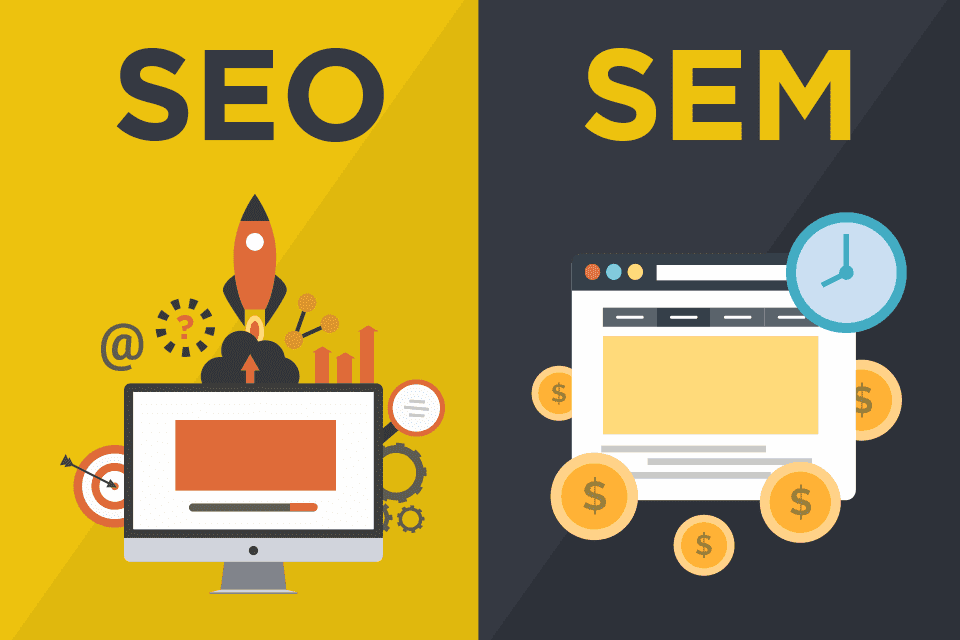
    Lots of time when people talk about SEO, it is rarely to discuss SEM at the same time. Though both are something that is important to understand in the world of the internet. Especially if you are in business that uses the internet for digital marketing. And so, you first need to understand the difference between SEO and SEM well.

    Definition of SEO and SEM

    SEO stands for Search Engine Optimization. SEO is an effort to optimize a website to get a top ranking in search results. If the position of your website is in the position of the best search results in the SERP it will allow others to find your website easily.

    Meanwhile, SEM stands for Search Engine Marketing. The definition of SEM is optimizing a website so that it appears in search engines by utilizing advertisements. In other words, the application of SEM requires tactics to properly advertise websites using various methods, such as Pay Per Click (PPC), and so on. It is clear that the implementation of this method requires a fee as well.

    Functionally, the two have quite a lot in common. However, in terms of how they work, they both have their own advantages and disadvantages. To be clear, let’s understand the difference between them.

    Understanding the Difference between SEO and SEM

    1.Target audience

    With SEM, you can choose the desired target audience, from age category, gender, region and others better than SEO. In addition, the target audience used in SEM is much more measurable and can be done at the beginning of setting up the ad.

    Whereas in the implementation of SEO, you can’t necessarily target the audience. You need to increase the content first on the website, then you can analyze whether the content is in accordance with the set targets. If not, then you need to do a lot more optimization.

    2.Rate

    When viewed from the process, both SEO and SEM do not immediately appear on the first page of search. However, when compared to SEO, the speed of results provided by SEM can be felt faster. SEM can also be turned off if it turns out that the intended target has not been reached, then reactivated after you have redefined the target audience.

    3. Time Period

    In contrast to SEM, SEO will have a long optimization impact. Meanwhile, SEM will only last for a specified period of time. In other words, the duration of the ad only lasts according to the amount of the fee you pay. While SEO will last for quite a long time in accordance with existing developments.

    4. Budget

    The difference between SEO and other SEM is in terms of the required budget. SEM in the form of paid advertising definitely requires a predetermined budget according to the time period you want. So in order to use it, you have to prepare a budget that’s not small. While SEO can be used at no cost. Simply put, SEO is free and SEM is paid.]

    5. Potential CTR (Click Through Rate)

    Lastly, the potential CTR of SEO is greater than SEM. Even though SEO and SEM results appear on the first page at the same time, people are less likely to click on paid ads than SEO optimization results.

    This is because people tend to avoid the “ads” sign that appear together at the top of searches. They will think the link that appears with the ad/ads sign is just a regular ad and doesn’t necessarily have the content they want.

    Understanding the difference between SEO and SEM will help you make better decisions in improving website performance. Then choose and decide according to your current needs. More here

  • Tips to Increase Search Engine Optimization

    Tips to Increase Search Engine Optimization

    Having a job in digital marketing, one must be familiar with Search Engine Optimization. Digital workers have always hunted digital marketing with this organic type to compete to make the website rank on the first page of Google.

    Search Engine Optimization means improving the website to increase its visibility when people search for products or services related to business in Google. The better visibility pages have in search results, and the more likely they will garner attention and attract prospective and existing customers to a business.

    This Search Engine Optimization capability is quite easy for visitors to get information about a product or service. Therefore, the content created in an article must be SEO-friendly to make it easier for Google to recommend to visitors. There are several ways to increase the website to be on the first page of Google in the ways below.

    Keyword Research

    Keyword research is the first thing to do to create SEO-friendly content. In analyzing these keywords, you can get information on what keywords are most often used. The results of this keyword research are useful for getting a list of competitors, keywords that bring traffic to competitors’ websites, competitor content strategies, and backlinks that competitors get. The purpose of this keyword research is that the content produced later can be better than competitors.

    On-page Optimization

    When you already know the keywords used to create content, it’s time to optimize on-page from SEO. On-page optimization is more focused on content and how to use the right techniques to make content SEO-friendly. To find out how the on-page optimization process is, don’t miss the step by step below.

    On-page content

    Content is a part of the website that has an important role. If the website is likened to a vehicle, this content is the fuel to run the website. Therefore, to create content, required conditions must be considered. This on-page content serves to create the best website pages by relying on E-A-T.

    Content writer SEO must be an expert who can write content that requires comprehensive, detailed, and easy-to-understand content. Also, a writer should have authority for the website has the authority to discuss a particular topic. If the writer expert and have authority, then writeable to trust and to be a trustworthy website.

    On-page technical

    After writing the content, it is also important to optimize the technical aspects of the content. Things to know that must be complete in this on-page technical are meta title, meta description, URL, internal linking, heading structure, and mobile-friendly.

    Some tips that are worth trying, namely, an attractive title with a maximum of 50-55 characters, a description used a maximum of 156 characters, a URL that must be clean according to the title, using the and structures, recommend other articles from the website relevant, and use mobile-friendly writing.

    Off-page Optimization

    Off-page SEO basically tells search engines like Google how visitors feel about your website, which can help you become an authoritative site by increasing visibility. This method also encourages people to mention your brand and link it to the material on your website. Help from outside the content is also needed for website optimization. Some tips that need to be done include:

    Trust Backlinks

    Backlinks play an important role in assessing the performance of a website. Website must consider the choice of this backlink, and although it has added value for those who include it, it is also quite risky if the links listed are from irrelevant links. It is better to use one backlink from an obvious source than many but irrelevant ones.

    Social Media

    After the content has been published, distribute the article with the help of social media to attract visitors to the website. Increasing the number of visitors can also increase traffic so that search engines can consider the website.

    Blog comment

    A good article can make the reader active. Therefore, the writing that is made must provoke the reader to comment if a lot of comments from visitors can make a better assessment.

    Measurement

    after all the steps have been done, don’t just stop there. It takes seo measurements to find out what our website visitors are like. There are several ways that can be done to measure SEO.

    Analytic

    First to know is Google Analytics. Google Analytics provides basic audience and behaviour metrics. It can segment user demographics, their devices to access your site, and whether they have visited your site before. It can also track website ad performance and overall traffic count.

    Behaviour

    It’s important to know user behaviour, use Crazy Egg to track. This trusted website visitor tracking resource provides intuitive “snapshots” of user behaviour. The Crazy Egg report includes a heatmap of website clicks, scroll times, and bounce rates combined with rich visitor information meant to offer a complete overview of each unique experience and how they interact with the content on your site.

    Visitor ID

    For this step, the best way to know visitor identity using Leadfeeder. Leadfeeder provides visitor identification and tracking software to assist marketing and sales departments identify and convert the best leads. Their account-level visitor identification technology ties every website visitor back to the company. The report, which visitor identity can integrate with many of the major CRM platforms, shows whether prospects are “warm” and to what extent.

  • Digital Marketing: 4 steps on How to Get Started

    Digital Marketing: 4 steps on How to Get Started

    Digital marketing has changed the way people live in various aspects. People search for information on the internet before doing anything. For example, in buying a cellphone, we should look for information regarding what cellphone to buy by considering all aspects such as budget, specifications, and brand.

    How to Get Started

    Go digital is the first step to start digital marketing. Here are 4 steps on how to start digital marketing:

    Determining Internet Media

    Without the internet, digital marketing cannot work. Internet media is a medium that is used to store product data, whether goods or services that we have. Preferably, we must have at least one of the following lists to start digital marketing.

    1. Website

    The website can be used as a medium for business, product, and contact information that we have.

    2. Social media

    The types of social media for our businesses and products can be in the form of fan pages and official accounts. We can make it using Facebook, Instagram, Twitter, or others.

    3. Mobile Application

    Mobile applications can generate loyal customers, but application development costs more.

    4. Marketplace Account

    The marketplace is very important, for businesses that sell products in the form of goods. By having a marketplace account, we can even get consumers more easily. This is because the marketplace already has loyal users.

    Determining Technology and Content

    Technology and content are second things to consider before starting digital marketing.

    Technology can have a big influence on digital marketing performance. For example, the platforms used to create websites, social media that will be used for official accounts, and advertising media that will be used for advertising.

    Content plays a role in conveying the meaning of digital marketing that is carried out. Creative content is widely used as advertising media in the digital era, such as video and moving image ads.

    Considering Cost and Time

    After the internet media, technology, and content are determined, the costs and time needed to realize this can be considered. For example, creating a website requires less cost and time than building an application to market products.

    Go Digital

    After that, we will be better prepared for the Go digital step, by realizing what has been determined previously.

  • Data Science vs Data Analytics: What Are The Differences?

    Data Science vs Data Analytics: What Are The Differences?

    Data Science and Data AnalyticsAs we are moving into the digital world, we begin to work more closely with data.

    Data has a vital role in decision-making and future prediction. So, data science and data analytics become two of the most important pieces of knowledge to learn.

    It’s not always easy to know the differences that separate data science from data analytics. What are they? 

    The Definition

    Data analysts and data scientists represent two of the most in-demand, high-paying jobs. These roles are number one for increasing demand in many industries and companies. Followed by AI and machine learning specialists and big data specialists.

    Data Science

    This subject relies on statistical techniques and machine learning tools to turn large sets of raw data into valuable insights.

    A data scientist professional would need more knowledge about technology and machine learning algorithms. This information will help them to understand the data and make decisions out of it.

    While data analyst roles require at least a bachelor’s degree in a field like mathematics and statistics, data scientists typically need to have at least a master’s or doctoral degree in data science, information technology, mathematics, or statistics.

    Data Analytics

    Data analytics is a field that uses statistical techniques to uncover patterns or trends in data. Just like its name, a data analyst also conducts some basic analysis.

    Understanding how to navigate programs such as Python or SQL is important to get the meaning of the data that they need to extract. But, coding isn’t generally required to do data analytics.

    What They’re Doing

    Data Science

    Using data techniques such as machine learning algorithms or design predictive modeling to handle both structured and unstructured data, data scientists have their role in predicting the future trend and make decisions based on it. 

    Generally considered a more advanced version of a data analyst, data scientist has a role in gathering, extracting, and processing raw data as well as designing predictive models and machine learning algorithms to mine big data sets.

    Data analysts also build data visualization tools and design reports to help in the process of decision making and predicting future trends by analyzing the current data pattern.

    Competency in technology can help data scientists to write programs that enable them to automate data collection and processing.

    Data Analytics

    As mentioned before, data analysts typically work with structured data to analyze gathered data and solve business problems by using tools like SQL, R, or Python programming languages, data visualization software, and statistical analysis.

    While a data scientist works by using advanced technology to figure out how current data affects the decision-making in the future, data analysts focus on collaborating with stakeholders to identify informational needs and how they can learn from the data.

    Data analysts acquire data from primary and secondary sources. These data are important to spot patterns and trends to be translated into actionable insights.

    Not only working in analyzing data, a data analyst must also be able to present their findings in an understandable way.

    Along with leaders and stakeholders, they can make data-driven decisions that will benefit many.

    In the end, both data science and data analytics are important knowledge to learn, especially during this digital age. The best decisions are the ones that are data-driven, so, being able to extract conclusions from data is necessary. 

    Related articles:

  • Does Captcha Protect your Website, Let’s See

    Does Captcha Protect your Website, Let’s See

    You must have been asked by a website to enter a unique code, or choose an image that matches the instructions, yes it’s a captcha, does captcha protect your website?. When you enter the wrong unique code you will be annoyed, don’t be upset, try to find out what it is and what it does?.

    What is Captcha? Does Captcha Protect your Website?

    Website users complain that there are many fake accounts that register and spam comments a lot. To solve this problem captcha technology was created in 2000. The effectiveness in that year reached 97%.

    Based on what we see, a captcha is an image, number, or whatever that verifies us that we are not a robot. Captcha is indeed easy for humans to pass, but for robots to pass it is very difficult.

    So, captcha is a technology to differentiate between robots and real users. The process is designed to be solved by humans and must be bypassed so that the user can access the desired site.

    Type of Captcha

    Recaptcha Google

    There are several captcha services available on the internet. Well, one of the providers is Google, the feature is called Google reCaptcha. Secure tools from Google are considered very difficult for robots to penetrate, but very easy for humans to use. Because Google’s reCaptcha has a dataset and documentation that is divided into two versions, namely: Google reCaptcha v2 and Google reCaptcha v3. What distinguishes the two reCaptcha is the automatic feature of reCaptcha v3, Google reCaptcha v3 will perform an automatic scan of visitor activity. For example, scanning customer posts on a review page. If detected as bot activity, the system will immediately delete the post. While reChapta v2 is still manual. An example of a reCaptcha image is below.

    Captcha

    Text Captcha

    This captcha contains text and numbers or even a combination of both. This type requires the visitor to enter a series of numbers or letters that are displayed. This captcha makes it easier for website users who have visual impairments. However, this captcha has many loopholes for spambots to break into because of its simplicity. An example of TextCaptcha is below.

    Picture Recognition captcha

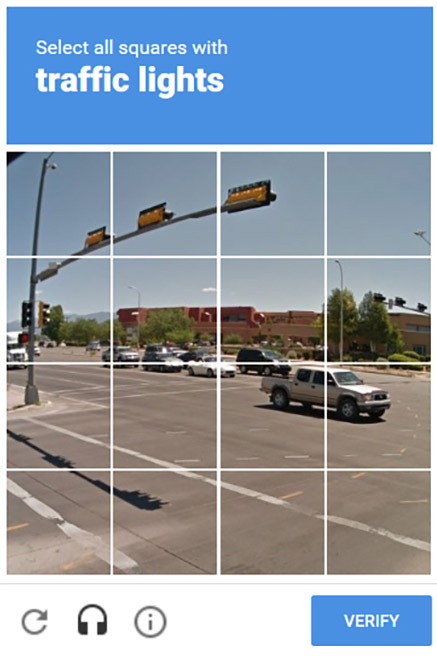
    This captcha requires visitors to select a predefined photo section before accessing a website page. For example, the system instructs visitors to select a section of the image of a traffic light as shown below.

    The advantage of this system is that it makes it difficult for the robot to spam, but the disadvantage is that this system takes a lot of time to pass it. There are many types of captcha that we rarely know and rarely use, namely math captcha, 3d captcha, jQuery Slider captcha.

  • Introducing Data-driven For Beginners

    Data-driven

    Working in a role that uses technology requires knowledge of data. The significance of data in our lives is becoming increasingly crucial, particularly in the workplace. Data can play a role in the decision-making process. Furthermore, data might be used as a reference for a task. Data is typically used in a variety of ways, one of which is data-driven.

    Data-driven is a method of completing work that is based on existing data. As a result, everything we do must be based on the facts we have. Data-driven decision-making is critical to our job. This is because the data that is pushed validates our work. After all, it is consistent with our data.

    Why Data-driven?

    Why using data-driven

    Data needs are always growing, necessitating the usage of data processing expertise. Companies need someone who can handle Big Jobs Data. Determining whether or not the decisions made by this data-driven organization solved the problem. Furthermore, if the judgment they make turns out to be incorrect, the data-driven firm will aid the firm in studying further data until the correct conclusion is made.

    In other words, through the data analytics process, a data-driven business teaches the value of using data in decision-making. Another benefit is that a data-driven company does not have to rely entirely on statistics to make choices; public opinion may also be used as a reference if proof and facts are present.

    Benefits of Being Data-Driven

    There are various reasons why being data-driven is important for the job:

    1. Increase the focus of work

    Data-driven work can increase the focus of work because it must be founded on facts. The data will eventually give a variety of data related to the task. Assume you’re a digital marketer putting together a marketing strategy for your company. You will obtain some information or a summary of your job if you choose the data-driven method. For instance, who should be the marketing target, what appeals to them, and what results? This knowledge will surely aid in the implementation of an effective marketing strategy.

    2. Easier decision-making

    Data-driven allows making quick decisions for the company’s good by using the right data at the right time. Understanding customer behaviour and anticipating their reactions are easier with effective data reading. Key market trends are also successfully identified using data-driven methodologies from all relevant elements.

    When programs are assigned directly to the company’s management, they frequently function well. When management is handed to the IT department, the results are frequently better. Managers have instant access to the company’s reference data, allowing them to make informed decisions. Simultaneously, they are aware of how to seek professional support.

    3. Predictive analytics 

    In predictive analytics, data-driven has articulately shown its worth. Users may now predict consumer reactions with greater accuracy. More and more exact data based on client histories are accessible to conduct very effective predictive studies.

    How to Implement Data-driven

    Let’s explore how to apply thinking to the workplace now that we’ve established its value.

    1. Examine your goals and prioritize them

    Make a priority to make work simpler reach goals. It is important to know ahead of time what goals will be completed and how to improve before deciding.

    2. Find and present relevant data

    After you’ve identified the problem to be solved and the decision to be taken, it’s time to gather and present relevant information. In this case, it’s crucial to highlight the word “relevant”. You don’t want to waste time gathering information that won’t affect your final selection. As a result, keep the data relevant by only collecting information that is relevant to your purpose.

    There are several ways to find data by using website analytics, CRM software, business intelligence platforms, social listening tools, and consumer feedback.

    The data will receive from existing data sources is rather extensive. The data must be carefully chosen and chosen according to the goals specified previously. This method keeps you on track and keeps you from becoming confused about the facts you should be focusing on.

    3. Collect and evaluate all of the data

    Collect all of the data after selecting which data is relevant. It’s not simply any information you’ll need to obtain. On the other hand, the data is accurate, truthful, and relevant to the work. Furthermore, the data must be unbiased and come from reliable sources. The data is easy to translate in some ways and has various interpretations in others.

    The system can analyze data with the use of specialized data analysis tools. If not, you can enlist the help of a friend who is a data analyst. The data analysis may take a lengthy time. The available data determines the length of time used alone. The more complex the data, the longer the data analysis process will be.

    Data-driven methods are not new, but in this digital age, they face substantial challenges. The huge amounts of data produced daily provide considerable prospects for the market’s desire for expertise. It’s simply a question of how the company implements a data-driven culture.

  • Data Science: An Introduction to Data Science

    Data Science: An Introduction to Data Science

    Data Science is one of the most promising and in-demand career paths in future trends. Data scientists are aware that they must be mastering the traditional skills of analyzing big data, data mining, and programming skills. They must be mastering the full spectrum of the data science life cycle and possess a level of flexibility and understanding to maximize returns at each phase of the process.

    Data Science Life Cycle

    Data Science Life Cycle containing five stages which are Capture, (data acquisition, data entry, signal reception, and data extraction) Maintain, (data warehousing, data cleansing, data staging, data processing, data architecture) Process, (data mining, clustering, data modeling, data summarization) Analyze, (exploratory/confirmatory, predictive analysis, regression, text mining, qualitative analysis) Communicate, (data report, data visualization, business intelligence, and decision making).

    What does Data Scienctist do?

    Simply, Data scientists are the ones who solved complicated data problems with their strong expertise in certain scientific disciplines. They work with several elements related to mathematics, statistic, computer science, etc. These professional are a data-driven individual who is capable of building complex algorithms to create information that helps the company to drive the strategy for the company itself.  They use the latest technologies for finding solutions that are crucial for company growth and development. Data Scientists present the data in a more useful form compared to the raw data available from structured or unstructured forms.

    What kind of skill that Data Science need?

    Besides programming skills, to be an efficient data scientist you also need some various skill-sets and competencies such as:

    1. You must be very innovative kind of person in applying various techniques to extract data and get useful insight from it
    2. Posses a hand-on experience in data mining techniques such pattern detection, decision trees, clustering or statistical analysis
    3. Able to locate and construct rich data sources
    4. Research and Analyzing data to create a useful insight
    5. Data Visualization that will help others to understanding what you’ve found
    6. Leadership and Communication that help you collaborate with other divison like Business Analyst, Engineers, and Product Managers

    Data Scientist should be very strong in Programming, Statistics, Mathematics, Business skills and working knowledge of the related skill-sets.

    How do I become a data science?

    In this topic, we will recommend you to study it thoroughly to provide the minimum background needed to start doing data science. Here is the following list for you to study.

    1. Multivariable Calculus

    Multivariable calculus is very important for you to build a machine learning model that will help you to be a better data scientist. You must be familiar with :

    • Functions of variables
    • Derivatives and gradients
    • Step function, Sigmoid function, Logit function
    • Cost function
    • Plotting of functions
    • Minimum and Maximum function values

    2. Linear Algebra

    Linear algebra is used for processing data, transformation data, and evaluation models. The topics you need to be familiar with is :

    • Vectors
    • Matrices
    • Transpose Matrix
    • Inverse Matrix
    • Determinant Matrix
    • Dot product
    • Eigenvalues
    • Eigenvectors

    3. Optimization Methods

    Being able to learn the weights that must be applied to test the data for forecasting, you must be familiar with :

    • Cost function/Objective function
    • Likelihood function
    • Error function
    • Gradient Descent Algorithm

    4. Basic Programming

    You may decide to focus on one programming language like R or Python for a beginner, both are considered as a top programming language for data science. You should acquire this basic skill:

    • Basic R syntax
    • Foundational R, for instance data types, arithmetics vectors, indexing, and last but not least data frames
    • Sorting, data wrangling, and data visualization
    • Jupyter notebooks
    • Be familiar with Python libraries. More Here

  • Hosting, What is The Meaning and Types?

    Hosting, What is The Meaning and Types?

    The pandemic has changed many offline habits to online, the need for the web is even higher. When you want to try to learn about web development, you will often find the word ‘hosting’, what is the meaning? is it different from a domain?.

    What is Hosting?

    Hosting is a server where all the website files such as image files, videos, scripts, etc. (Website files) are stored and can be accessed and managed via the internet. In an analogy, hosting is like an empty apartment that you rent, then you fill it with your personal furniture. If on the web the furniture can be scripts, images, or videos.

    Type

    Hosting companies offer several types, before ordering, know in advance which type is suitable for your website.

    Shared Hosting

    This service is used by several users, this service is suitable for those of you who just want to learn to develop the web. It’s like you rent an apartment with friends, you share the space in the apartment.

    If there are too many people in the apartment, you will definitely feel full. the same as hosting, too much web in it then your website will be affected.

    The advantages of this service are low prices, the server is fully managed and maintained by the provider such as disk space, unlimited bandwidth, databases, up to SSL.

    The disadvantage of this service is that the website will be disrupted if there are users who use the facilities excessively. file storage and server facilities are limited.

    This service is suitable for beginners who are learning to develop websites, although file storage and server facilities are limited, the price is still cheap.

    VPS Hosting

    VPS or Virtual Private Server is a type of private service whose resources are only used by one user. Thus, the server will not be affected by the use of other users.

    In this type of hosting, you have the freedom to manage and manage the available resources independently. This means that you need to have technical skills in server management.

    In an analogy, this VPS is like a one-bedroom apartment that provides personal facilities. Where each apartment has its own electricity, water, bathroom, and kitchen meter. In contrast to boarding houses, all of these facilities are combined with other rooms.

    Cloud Hosting

    This service is a combination of shared and VPS, dedicated resources like VPS, but with convenience like Shared Hosting. It’s equipped with technical assistance from the hosting manager (fully managed), in addition, settings and configuration can be done in the control panel. You don’t need to have technical skills to manage servers to be able to use this type of cloud.

    data and files on the website are stored on a virtual server/cloud via the internet. So it does not require physical storage/hardware like traditional hosting.

    In terms of the budget/cost for renting hosting services, of course, it is also adjusted to the usage capacity. The larger the required capacity, the higher the costs. In this service, there are indeed a variety of services to choose from, all of which can be tailored to individual needs.

    Dedicated Hosting

    Dedicated is a service managed by a company, where clients can rent the entire server and will not share it with anyone. This will provide more advantages than Shared. Because in one server there is only one hosting account and we are free to use it according to our wishes and needs.

    Dedicated is usually used by large business owners, dedicated is chosen because the website will have full rights to the server he rents, including to choose the operation, the hardware used, and so on. Choosing dedicated also makes it easier for business owners to overcome the problem shoots that occur.

    Choose best Hosting For your website

    Of all types of service is decided according to your needs. If you are someone who is learning choose Shared. If you are a businessman with mid scalability website needs, you can choose cloud. While if you need high scalability website you can choose a VPS for cheaper or dedicated for an expensive one.