Author: Sagara Technology

  • Technology Trends In 2022 That You Need To Know

    Technology Trends In 2022 That You Need To Know

    A recent study reveals that there will be new technology trends that could spark attention in 2022. Sagara sums up the top 12 technology trends for you.

    These trends will probably have a great impact on the business landscape in the future, especially for tech-based enterprises. In this article, we will explore more about these technology trends and find out why it matters.

    12 Technology Trends In 2022:

    Generative AI

    Artificial intelligence opens up countless possibilities for us. From intelligent marketing to fraud prevention, AI has indeed transformed some aspects of our lives.

    As of now, it even allows machines to use textual or visual data to generate new content namely Generative AI. This technology trend become quite a buzzword owing to new applications like DeepFake.

    With Generative AI, computers can generate similar content by abstracting the underlying pattern related to the input which can be useful in areas like software code creation and healthcare development.

    However, the development of this tech trend will pose certain challenges like data privacy or fraud-related crime. 

    Data Fabric

    Data fabric is an all-in-one data integration system that combines architecture, data management, and integration software, as well as shared data to help enterprises manage their data. 

    Ideally, a data fabric will provide a consistent user experience and real-time data access to data for any member of enterprises worldwide. But in order to maximize its benefit, organizations must first understand its data consumption patterns and regulatory compliance needs. Find out more about data fabric right here

    Cybersecurity Mesh

    Next is one of the technology trends that provides strategic solutions to tackle cybersecurity issues known as  “Cybersecurity Mesh”. Using distributed architectures, enables scalable, flexible, and reliable cybersecurity control, particularly for identity and access management (IAM).

    Cloud-Native Platforms (CNPs)

    The cloud-native approach is a modern way to build and run software applications that takes advantage of the scalability, flexibility, and resilience.

    This includes the various tools and techniques used by developers today to build applications for the cloud.

    With cloud-native platforms, systems such as microservices, cloud platforms, containers, Kubernetes, immutable infrastructure, declarative APIs, and continuous delivery are brought together with techniques such as DevOps and agile.

    Composable Applications

    For enterprises that want to innovate and adapt applications rapidly and dynamically, they must try to implement composable applications. 

    Developed with business-centric modular components, this technology trend allows developers to reuse code more easily, cutting down on time-to-market for new software solutions and enabling new business opportunities.

    Decision Intelligence (DI)

    Decision intelligence (DI) is actually an old tech trend with some slight twists. Using DI, business decisions can be modeled in a simple and reusable way, making them more efficient and accelerating time to value.

    This will be achieved through the use of automation that enhances human intelligence. According to predictions, one of the third large enterprises will use DI in the next two years for better and more structured decision-making.

    Distributed Enterprise

    Distributed enterprise uses digital-first as well as remote-first business models to improve employee experiences, creating digital touchpoints for consumers and building out product experiences.

    By allowing employees to work remotely, this model opens up new opportunities for talent acquisition.

    Total Experience (TX)

    Another emerging tech trend to watch out for is Total Experience, which combines employee, user, and customer experience to transform business outcomes. 

    If enterprises are able to adopt the right TX strategy, they will achieve differentiation by leveraging new experiential disruptors.

    Autonomic Systems

    Although autonomic systems applications are still in their early stages of development, they will gain more ground over the next half-decade. 

    Autonomous systems learn from their environments and dynamically modify their own algorithms in real-time to enhance their performance in complex ecosystems. It will help enterprises survive hostile environments, ensuring they are always ready for change.

    It encompasses a range of technologies to create trusted environments for data sharing, decentralized analytics, and data encryption.

    Hyper Automation

    Hyper Automation will definitely receive the spotlight in the future as automation is a key component of digital transformation.

    Combining machine learning (ML), software, and automation tools, Hyper Automation can help create a feasible business and IT process for enterprises.

    AI Engineering

    As many companies indeed have different levels of staying power and long-term value from AI investments, company leaders need to create a sustained effort to gain more value from these investments. Applying AI engineering can provide the solutions.

    AI engineering streamlines AI delivery by automating updates to data, models, and applications.

    These technology trends may have impacts on each trend, however,

    The strategic technology trends listed above will be able to speed up digital transformation as it addresses common challenges faced by enterprises particularly tech-based enterprises.

    So, in order to determine which trends to prioritize requires an in-depth understanding of both long-term and short-term business objectives.
  • 5 Ways Employees Adapt To The Digital World

    5 Ways Employees Adapt To The Digital World

    By 2021, We need to adapt to the digital world. But there is no need to worry about a change, We have 5 ways to adapt to the digital world.

    The Covid-19 pandemic is also a major factor causing all works to switch to digital. Of course, there are many pros and cons when the transition takes place, but the transition to digital still needs to take place so that all work can continue well.

    Today, the digital world is very easy, especially when we do a job. Changes that take place do take time, such as a sales system that is still manual and if you want to change everything using digital, customization is necessary, especially for users of the system. As a system user, you will surely find it difficult initially due to the changes that are taking place.

    But there is no need to worry about a change, especially the transition to the digital world. there are several ways we can do to adapt to the digital world, especially for employees who have previously worked without digital. Here are five ways we can make it easier to adapt to the digital world:

    1. Try to learn new things

    New things will definitely make us think about how to do it or how to use it. Learning new things can also allow us to add new knowledge that we have not mastered before or did not know at all. We must try to find out what we have never learned and will certainly be very useful for our abilities in the future.

    2. Learn from the experienced

    When we are confused to find the place and can not see the GPS, we will of course ask for help from local people living in the area. similarly, when we are confused to learn new things, we need someone who is experienced who can help us understand what we are confused about.

    3. Ask a lot

    When we experience a transition to digital when we work, sometimes when we are explained and taught how we like to feel as if we understand, even if we do not understand what has been learned. So we should ask questions and not be ashamed if we do not understand. Be honest if you do not understand and ask to be explained again.

    4. Work with other employees

    At work, we have a team and in that team, there has to be someone who understands more of the work that the team is doing. It takes a lot of collaboration with other employees if someone is having problems, especially if they are experiencing a transition that is quite large and takes time to adjust.

    5. Attend workshops and seminars

    When we work, there may already be a mentor or person who is an expert teaching us about the transition to digital. But it is not wrong if we can seek more knowledge outside of where we work. Like attending seminars and workshops related to digital or how to adapt to the digital world.

  • What is Open Source Software?

    What is Open Source Software?

    Have you ever heard the term Open Source? Usually, this term is used when it relates to software. If you use an Android smartphone, then the Android operating system is an example of open source.

    For those of you who are not by profession as a programmer, of course, it’s natural if you don’t know the term open source. You may not even know how an application works. However, a programmer must know the term open source. This relates to the license of the application released to the public.

    What is Open Source Software?

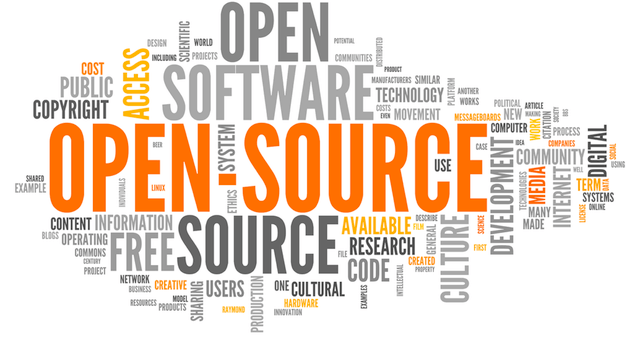
    Open Source Software (OSS) is a publicly published software or computer program code. This allows other users to modify, improve the program code that has been published. Usually, the Developer team develops OSS with a collaborative system

    How Does OSS Work?

    Usually, the Developer team stores OSS data in a public repository. This allows any user to access the program code. Users can modify, improve, and participate in application development. The development team distributes OSS with a distribution license. Here are 5 OSS licenses that are popular among programmers:

    1. GNU General Public License (GPL) 2.0
    2. GNU General Public License (GPL) 3.0
    3. MIT License
    4. Apache License 2.0
    5. BSD License 2.0 (3-Clause. New or Revised)

    When you modify program code, OSS requires an explanation of the changes that have been made and the method used.

    Advantages of Open Source Software

    Open Source Software has several advantages over proprietary software. One of them is free. Here are some advantages of OSS:

    1. OSS is flexible. This is because OSS is released under a public license. Public users can modify the program code that has been provided.
    2. Application development with a community system. This enables continuous application development. Of course, with the support of a solid community.
    3. OSS can offer learning opportunities for developers. A public license allows other developers to learn and contribute to the application.

    Disadvantages of Open Source Software

    Behind the advantages that have been mentioned. Following are the disadvantages of OSS:

    1. Hardware compatibility issues. This is possible for OSS. Computers need special drivers to run an application. Of course, this is a challenge for OSS. To create a driver, it takes time and even money for the application to run on many devices.
    2. Application security. This is one of the weaknesses of OSS. Applications can have security vulnerabilities due to program code that can be accessed by the public.
    3. Application support. Applications that are proprietary software must have full support from their developers. However, for OSS this is not necessarily the case. Application support may be limited to community support only.

    That’s an explanation of Open Source Software (OSS). OSS has several advantages including being free. In addition, the application development is relatively stable, if supported by a solid community.

  • Cybersecurity in the Workplace: Tips for 2022

    Cybersecurity in the Workplace: Tips for 2022

    In the workplace, cybersecurity is everyone’s responsibility. Hybrid work models that enable employees to work both from home or the office have transformed the workplace experience, but this has also blurred the line between work and home life, changing how and when employees access company information. As cybersecurity crimes continue to increase, it is vital that both employees and employers are prepared to prevent and respond to security risks. Read on to learn about some of the workplace cybersecurity tips for 2022:

    Cybersecurity Tips for 2022:

    Employee Training

    The most standard way to learn more is to engage with security training. Many companies implement standardized training courses to cover the basics, but these must expand to cover device management in new hybrid circumstances. Employees must be able to competently protect themselves if making use of anywhere work.

    Maintain Device Hygiene

    This covers many disparate practices that culminate in a user’s IT health score. Proper device hygiene can include logging out of applications when finished, closing windows, consistent device resets, not letting others handle corporate devices, and continually updating applications. Some issues like outdated software bear more obvious security risks, but having an idea of how a device normally runs helps users identity when something is amiss. A sluggish device, sudden usage of memory, and otherwise can signal when a device has been compromised.

    Secure Password Management

    This one may seem the most obvious, but often poor password management can lead to major breaches.  Changing passwords often and choosing passwords that are complex, unique, and phrase-driven makes it easier to remember new passwords and remain secure. Likewise, be careful where physical records of sensitive data and information are kept.

    Document Suspicious Activity

    The myriad means hackers have to acquire corporate data means that recognizing a large-scale predator effort can be difficult. Keeping a log of suspected cyberstalking activity and informing employers can help in recognizing when a company is at risk.

    Cybersecurity threats are becoming more common, and while many companies may believe they are protected there are common vulnerabilities that can lead to wide-scale breaches and security-related shutdowns. Don’t wait for the worst. Our team of experts provides offensive strategies that identify and resolve weaknesses as well as providing defensive solutions to prepare for attacks when they happen. 

  • What is Data Fabric? Technology Trends for 2022

    What is Data Fabric? Technology Trends for 2022

    We live in globalization where technology growth is very fast. technology transitions are now often encountered everywhere. Not infrequently we are often clueless to use or recognize the technology. but you need to know that the more you come here, the more new discoveries you make for certain purposes that will become a trend and benefit people or companies. In 2022, it is predicted that data fabric will become one of the technologies that will become a trend that year. see more in this article.

    What is Data Fabric?


    Data Fabric is an architecture and a collection of data services that provide consistent capabilities across both on-premise and multiple cloud infrastructure environments.

    Data Fabric simplifies and integrates data management to accelerate digital transformation. it enables consistent and integrated hybrid cloud data services for data visibility, data access, data control, data protection, and security.


    Why Must Data Fabric?


    In a world where technology is changing the way we live, digital transformation is on the corporate strategic agenda. In achieving digital transformation success. Data is the lifeblood of the company and enables multiple customer touchpoints through technology, creating innovative business opportunities, and optimizing operations.

    Leaders have the challenge of processing data and implementing it throughout the company with limited time, capacity, and budget. Currently, the data is distributed, dynamic, and different, so currently the data is large and difficult to manage.

    To stay competitive, most companies use a data-centric approach that requires. On the other hand, the data management particularly approach is secure, efficient, and provides freedom of choice.


    Read More Our Article:
    What Can Augmented Reality (AR) be Use For?
    6 Software House Services You Need to Know


    So What It can do for you?

    A data fabric ultimately helps your organization unleash the power of data to meet business demands. It allows your IT organization to better harness the power of the hybrid cloud. Builds a hybrid multi-cloud, and modernize storage trough data management.

  • Follow These Steps For Website Development Process!

    Follow These Steps For Website Development Process!

    Almost all business people learn website development to create a site as an investment in developing their business. Starting from a novice businessman to a professional, they must do it.

    However, many of them failed to create the website a buyer’s value for their company. Whether it’s a functional issue, maintenance, to the layout of the design on the website display.

    However, in this case, there are still many mistakes that are often made because they don’t understand the basic concepts of the website development process. From the process of developing a website, you must have some basic knowledge and skill about the stage of creating the website itself. 

    So, later from this stage, you will find an understanding of the process of creating and developing a website. 

    Once you have an understanding, you will automatically find it easier to solve problems you may find when you develop a website. 

    But, you don’t need to worry about where to start.

    In this article, We will discuss the steps in website development that you have to follow

    Steps 1: Information Gathering

    As the first step to the website development process, it is important for you to do research and gather information. Discover as much information as possible and determine how the subsequent steps will look like. 

    This initial part is very important because you need to know and understand what your goal is to develop a website, the main goals you want to achieve, and what audience you want to reach. 

    A well-described and detailed plan based on these first steps of development data can protect you from spending extra resources on solving unexpected issues. 

    Some experienced agencies usually start this step by conducting sort of survey or questionnaire. So, it can help them to know the important aspects of their business and the purpose of website development. 

    Therefore, they often include business details, business goals, target audience, and competitors.

    Steps 2: Planning

    The next step is planning. At this step, you will define the website layout and core functionally. From the data that you have collected in the first step, you can make:

    • Sitemap: A sitemap should describe the relationship between the main parts of your website. Such representation could help understand how usable the final product will be. The main reason behind creating a sitemap is to build user-friendly and make it easier for users to navigate the website. 
    • A wireframe: This is the layout on each page of the site. The wireframe is a visual representation of the user interface (UI) that you are going to create. But, it doesn’t contain design elements (colors, logos, images, etc). It is artless because it only describes the elements that added to the page and its location

    Steps 3: Design

    Photo: Pixabay

    The real design is in here. The user interface (UI) design step will help you for branding the website and complete the look and feel of your website. 

    The design has a role to play in ensuring your digital presence is consistent with all other marketing assets. In web design, there are many ways you can explore a subject. The best web designers will analyze your assets to identify common elements. 

    The final result of this design step is a website layout. It can ve a graphic sketch or an actual graphic design. The main function of layout is to represent information structure, visualize content, and demonstrate basic functions. 

    The layout consists of colors, logos, images, and provides a general understanding of the product.

    Steps 4: Content Creation

    Photo: Pixabay

    This step of the website development process includes planning, writing, to the editing process of various forms of the website content. It’s including landing pages, testimonials, product/service development, case studies, videos, images, and blog posts. 

    Keep in mind that the quality of web copy can give users the information they need. So that they end up making a purchase decision. 

    Meanwhile, strategic keyword optimization can also place your web content at the top of search engines and have users with high purchase intentions.

    Steps 5: Coding

    Photo: Pixabay

    Finally, it is at this step that you can finally start creating your own website. you can use all the elements that have been designed in the previous steps to create an actual website. 

    Usually, everything starts from the foreground. So, you can create a start page first, then add all the subpages according to the website hierarchy that was previously created in the form of a site map. 

    In addition, a framework and Content Management System (CMS) must be implemented to ensure that the server can handle the installation and set up smoothly. Then, when you use CMS for site creation, you can also install CMS plugins if needed. 

    Another important step is SEO (Search Engine Optimization), where you optimize website elements. Like titles, descriptions, keywords, and more that can help you achieve higher rankings in search engines.

    Steps 6: Testing

    Next is the testing step. At this step, you should check and test every link, form, every script, and run the spell checker software. So that there are no possible typos. Also, use a code validator to check if your code follows current web standards. 

    After you have checked your website repeatedly, the next step is to upload it to the server. FTP (File Transfer Protocol) software is used for that purpose. 

    As a suggestion, make sure that all of your files are installed correctly in a way that after you deploy the file, you will have to run the test again.

    Steps 7: Maintenance

    Photo: Pixabay

    The final step but a never-ending work of the entire website development process is maintenance. Once your site is live, you may need a variety of additional elements. Like, advertising agencies help and support to increase the number of pages, also add more functions and features. 

    For this reason, you need to perform certain tasks on a regular basis, including:

    • Edit existing content
    • Fixing bugs and issues
    • Dosing site backups
    • Installing plugins
    • Adding blog posts

    In addition, as web digital design evolves as well as changes, you also need to keep your site up-to-date in terms of UX and SEO.

    Those are the steps you have to follow for the website development process. Hopefully, this article can help you to start developing your website as well. 

    If you have any difficulties or problems regarding your website, you can visit Sagara Technology for a consultation or asking for solutions. Sagara will make your website provide the best experience for users. 

  • Website Development Skill You Need to have in 2021

    Website Development Skill You Need to have in 2021

    If you have an interest in website development, take a look at these 6 website development skills you need to have in 2021. The meaning of website development is the development of a website that aims to update the content of the website, create a website, maintain the website and also add some required features.

    In a career as a website developer, you should always learn something new and not be left behind. Because some features allow it to be constantly updated as well as the programming language used, it will definitely keep growing over time. In addition, there are still many things that need to be mastered if you want to become a website developer.

    6 website development skills you need to have in 2021

    Learn programming languages

    Website development will definitely not be far from coding. When coding, the programming language is needed as an intermediary between a website developer and a computer to create the desired features. Like adding a button to a web page, adding or changing words, and adding pictures.

    Do good planning

    Planning is very important, why? Because when we want to start a website development project, we have to look at it a lot from different perspectives. As users will need later when the website is updated, the time it takes for a website developer to not be too long, what databases, what hosting will be used, and how much budget will be needed during the process up to the website interview. If you do not have careful planning, it can lead to inefficient website development work.

    Work in a team

    Most website developers do not work alone. In the development of the website, there will be many who will participate. Website development itself can be divided into two teams, namely front-end developers and back-end developers. These two teams will work together to create a website. But some work as front and back, called full-stack developers. Everyone will work together to create a website that will be useful to users.

    Good communication

    When creating a website, there will usually be several issues that will be the task of a website developer. If a website developer does not have good communication, namely to customers or fellow teams, it is feared that it will cause misunderstandings between the two parties. Good communication does not always have to convey our opinions but can also be a good listener to the problems experienced.

    Accuracy

    Accuracy is very important if you want to create a website. Why? Because when we create a website, we see that some of the features work well, but when the output does not match, there must be an error. Sometimes the problems that arise are not always errors or bugs, it could be that the error that arises is that we want the result A but the result that is issued is not A then it can be fatal.

    Always learn new things related to website development

    Sometimes we forget that the development of technology is very fast. Some features need to be updated and need the latest version to do the update. Do not let us feel that we have mastered our website development without learning new things and the latest version. Try to learn new things so that you do not fall behind with the latest information. The latest version is there because the needs have been adapted to the times and it needs to be carefully considered.

    Increase ability

    Almost the same as learning new things, but more to add to the ability we have never learned. For example, if a website developer has a certification in programming language A, it is possible to learn another programming language. To add skills, you can get some tutorials on Youtube or you can take courses according to the abilities you want.

    If you want to become a website developer, the above capabilities will be very useful. A career as a website developer is sometimes considered a difficult thing, but if you already know what skills are needed, you will be able to develop even better. Do not forget to always update your skills.

  • How to Check Website Speed Performance

    How to Check Website Speed Performance

    Website speed is one of the important things in managing a website. A good website is not only seen from the content but many things must be considered. A website that has a good loading speed, of course, has a positive value from the visitor’s point of view. In addition, website speed is one of the assessment factors in SEO.

    Many things can be done to optimize to increase website speed. We can minimize the unnecessary use of CSS and JavaScript. In addition, we can compress HTML and images. For WordPress users, many plugins can make it easier to optimize website speed. Plugins that you can use for example WP Rocket, WP Fastest Cache, W3 Total Cache, etc. After optimizing, you can check the speed of the website through the following online tools:

    1. Google PageSpeed Insights

    Google PageSpeed Insights is a service to check website speed provided by Google. Here’s how to do the test:

    • Go to the Google PageSpeed Insights website.
    • Enter the website address in the column provided.
    • Then click, Analyze.
    • Wait for the analysis process to complete. After that, the website speed score will appear.
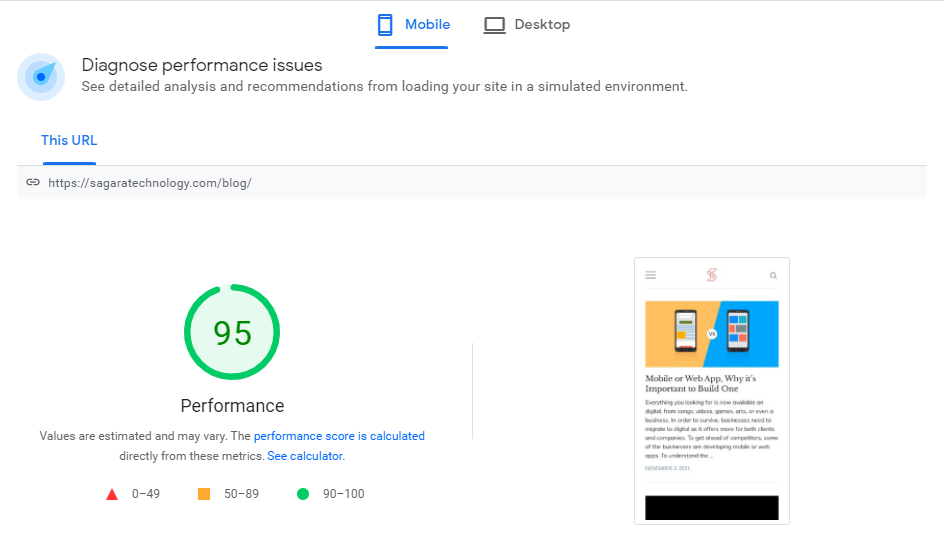
    PageSpeed Insights

    The picture above is an example of website speed testing for the Sagara blog. Google PageSpeed Insights provides two test versions. Test version for mobile and desktop version websites.

    2. GTmetrix

    GTmetrix can be used to check website speed. The method is almost the same as the previous tools. Here’s how to do the test:

    • Go to the GTmetrix website.
    • Enter the address of the website to be analyzed.
    • Then click the test button.
    • Wait for the analysis process to complete. After that, the test results will appear.
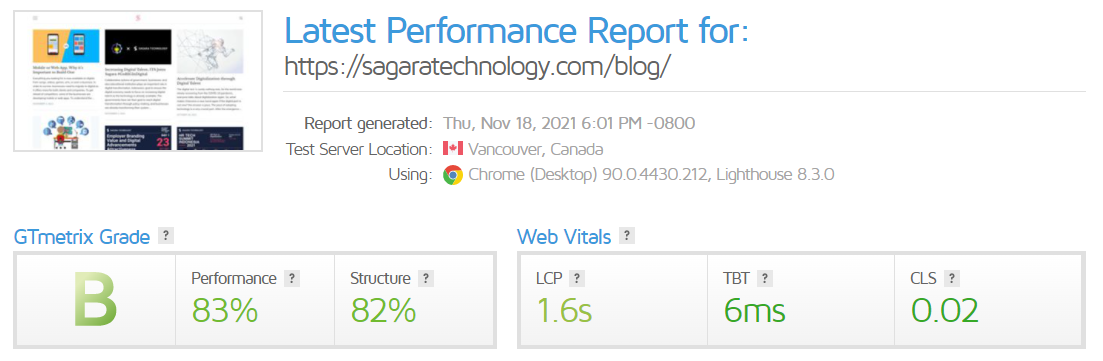
    GTmetrix

    The picture above is the result of checking for the Sagara blog. In the test results, some recommendations can be made to increase the website speed score.

    3. Pingdom Website Speed Test

    The last online tool that you can use to check site speed is the Pingdom Website Speed Test. How to use it is almost the same as the previous tools.

    • Open the Pingdom Website Speed Test website.
    • Enter the website URL and select the checking server.
    • Click the start test button.
    • Wait for the analysis results. Then the test results will appear.
    Pingdom Website Speed Test

    The picture above is an example of the test results from the Sagara blog. In the results above, there is information about the score, page size, and time to load the page.

    In addition to the 3 websites above, many other websites can be used to check website speed. Website speed optimization is done so that visitors are comfortable when accessing our website. In addition, this becomes a factor in the SEO assessment. Of course, optimizing website speed can help provide more value for our website.

  • 5 Techniques that Must be Acquired by Backend Developer

    5 Techniques that Must be Acquired by Backend Developer

    A career in the digital world is very broad. Opportunities and job opportunities cannot be denied, such as in the marketing and information technology divisions. As we know that in the marketing department, there are currently business development, digital marketing, social media marketing, SEO and many more, but it is important to know that at this time the job that is attracting and being sought by many companies is backend developer.

    What is a Backend Developer?

    Backend developer is someone responsible to managing servers, applications and database.
    Picture By: Unsplash

    A backend developer is someone responsible for managing servers, applications, and databases so that they are well integrated with each other. They are the best problem solver because they work behind the scenes, all that is not seen by the end-user or interacts directly, but they make an optimal contribution in carrying out their duties. Then what are the techniques in order to become a reliable backend developer?

    5 techniques that must be acquired by a backend developer.

    Identify Database

    Some backend developers think that there is no need to master the database, just normalization or understanding the basics. That’s not the case though. Just making the wrong structure can cause slow API/web application performance.

    Fundamental Programing

    Conditions, variables, looping, OOP are mandatory things that must be matured, why? Actually, if you are a frontend/mobile dev, you will also meet them, but in the backend you will encounter many conditions and loops, and their difficulty level increases to nested. Mistakes in your algorithm can cause memory leaks or poor performance for the server.

    Choose your languages

    Actually, all programming languages ​​for the backend are okay, but you have to be able to adjust it according to your needs, you definitely don’t use golang to create a web. Likewise, you are less likely to make analytics using PHP, if you need speed you will choose python/R or Go. Choose a language that is okay with the times such as ruby, Node.js, Python. PHP is still okay

    Version control system

    Another back end developer skill that needs to be mastered is the Version Control System (VCS) which functions to regulate the version of the code in every website development. With this skill, your work can be more structured because every change is well recorded. Especially if you work in a team.

    For example, you are working on a feature on your website. You and your colleagues can work on tasks with different version names. With VCS, you can easily know which version has the best features, and then combine them in a new version. That way, website development is done faster.

    API Management

    Application Programming Interface (API) is a set of code that allows a piece of software to interact with other software.

    You could say, the API function is the same as the language function in humans. By learning the API, you can create interactions between software.

    Then, why does a back-end developer need to learn API management?

    Because, if you understand the API, you can make your website connect with a lot of software. For example, you can connect a website with an Android application.

    Are you ready to become a backend developer???

    According to the Bureau of Labor Statistics, the career outlook for web development is favorable, as the industry is expected to grow much faster than average. As with most web development careers, location can make a big difference in terms of average salary.

    To become a backend developer is not easy, we have to master hard skills and soft skills that have been honed to become the best backend developers, but you need to know there are many ways to become a backend developer, namely you can practice and master programming languages ​​for the first time, by mastering programming languages ​​you can know aspects The most important thing is to be a backend developer.

  • Mobile or Web App, Why it’s Important to Build One

    Mobile or Web App, Why it’s Important to Build One

    Everything you looking for is now available on digital, from songs, videos, games, arts, or even a business. In order to survive, businesses need to migrate to digital as it offers more for both clients and companies. To get ahead of competitors, some of the businesses are developing mobile or web apps.

    To understand the importance of having an app for your business, first, you need to understand the difference. Mobile apps are not the same as web apps. It’s a little bit tricky to know the difference as it looks almost the same.

    First, It is very useful to distinguish between these two. To get a better grasp on this, let’s take a look at the difference between mobile and web apps.

    Difference between Mobile and Web App

    While the design has similar looks, these two are different products. To show the difference, we can see from how they build, advantages, and the need for internet connections.

    Native mobile apps are downloadable versions of the app that is built specifically for Android or iOS. So to build one, it uses a different programming language. On the other hand, a web app is a website (HTML, CSS, JavaScript) with a fluid design that can adapt to the screen size of a smartphone.

    Mobile apps are much faster and efficient, but they need to download for an update. While the web app is less complex to build and update regularly without the need to download.

    Both mobile app and web apps are using the internet connection. The difference is that some mobile apps can run even without the internet. So, Why is it important to build one for your business?

    Benefits of Having Apps for Businesses

    If your business is relying on mobile phone usage, you might need a mobile app or a web app. For example, if you run a shipping company, customers need to know the process of the delivery or tracking their package. Therefore, having mobile or web apps are advantageous.

    It is very clear that our activity is mostly on mobile phones, and that’s one of the big reason why your business need to build and have one. From the budgeting perspective, building a web app is far cheaper and it is less maintenance cost than a mobile app. But if your company is focusing more on efficiency and speed, the mobile app is where you go.

    Today, everyone is rushing to accelerate digitalization in their businesses. Not every company has the capabilities to build one or has the digital talent to support this idea.

    Take a look at Indonesia for example. Many businesses and the government are pushing digitalization but still lacking digital talent. Thankfully, many tech startups and companies in Indonesia can provide the need.

    One of them is Sagara Technology that engaged in technology. They continue to strive to create great ideas and invest time in product development that contributes to the future of technology. To grow your business from website, mobile apps and even IoT, feel free to reach us and learn more.